Author: admin

  • The Role of AI Chatbots in Streamlining Customer Service Operations

    The Role of AI Chatbots in Streamlining Customer Service Operations

    Customer service can make or break your business, especially when you’re a small team or solo founder. 

    Every unanswered message means a missed opportunity, and every delayed response risks customer trust.

    That’s where AI chatbots for customer service come in,  intelligent, always-on virtual assistants that can manage hundreds of conversations at once, provide instant responses, and ensure no customer is ever left waiting.

    Powered by artificial intelligence (AI), natural language processing (NLP), and machine learning (ML), these bots do more than chat, they analyze, understand, and solve

    From automating ticketing systems to syncing with CRMs, they’ve become an essential piece of the modern entrepreneur’s toolkit.

    In this guide, we’ll explore what AI chatbots are, how they operate within customer service, and how founders and solopreneurs can use them to build lean, scalable businesses.

    Key Takeaways

    1. AI chatbots for customer service enable 24/7, scalable, and personalized support.
    2. Entrepreneurs save time and costs through automation and analytics.
    3. Hybrid models combining bots and humans deliver the best CX.
    4. Real-world data proves tangible ROI across industries.
    5. The future lies in proactive, generative AI-driven customer service.
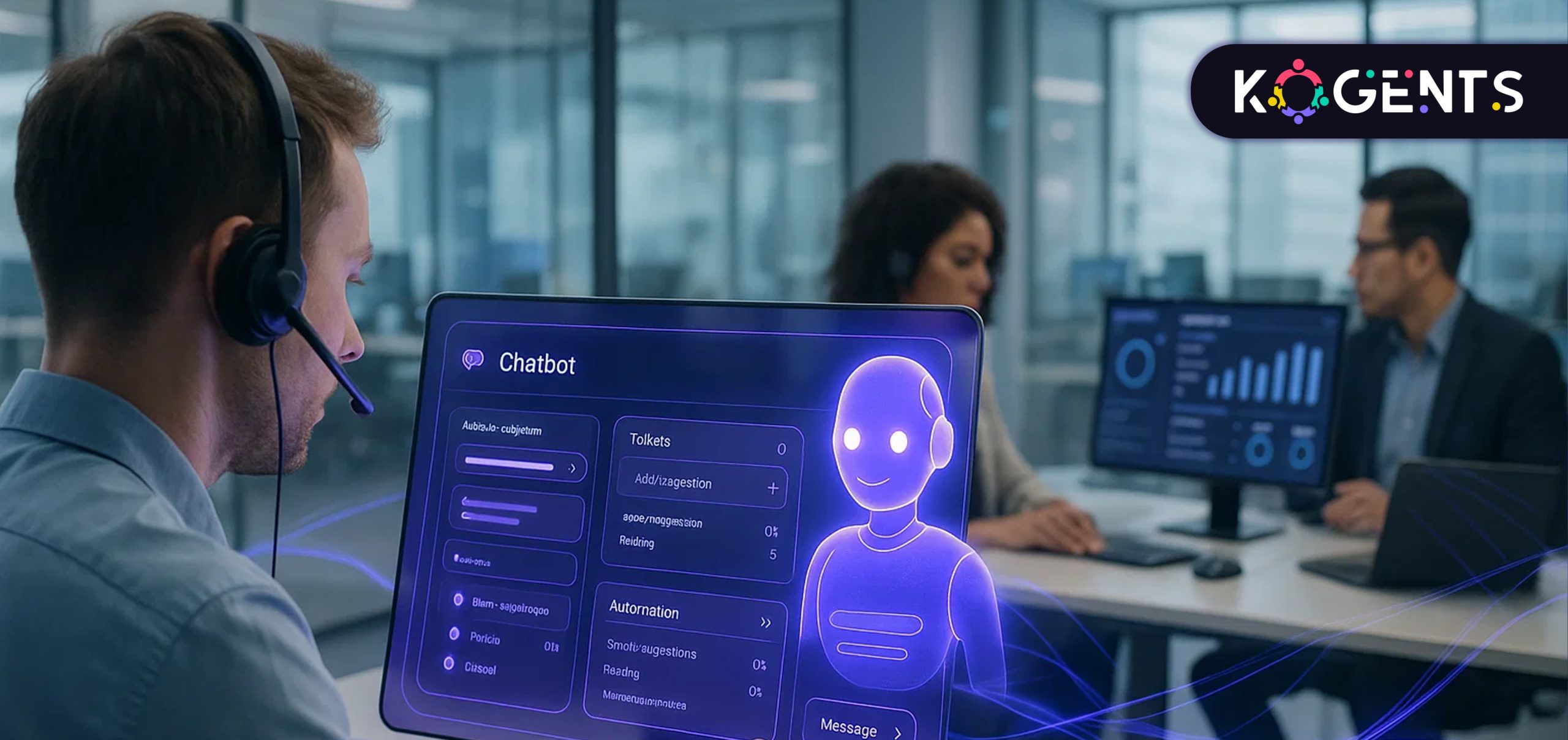
    ai chatbots for customer service enable

    What Are AI Agents (Chatbots)?

    An AI chatbot for customer service is a digital assistant built to interact with customers conversationally, through chat or voice, using AI, NLP, and machine learning.

    Unlike traditional rule-based bots that follow prewritten scripts, AI virtual assistant for businesses and AI chatbots learn from every conversation. 

    They can interpret user intent, detect emotion, and respond in a natural, human-like tone.

    Key Technologies Powering AI Chatbots

    • Natural Language Processing (NLP): Understands text or voice queries.
    • Natural Language Understanding (NLU): Interprets meaning and context.
    • Machine Learning (ML): Improves accuracy over time.
    • Generative AI: Crafts adaptive, personalized responses.
    • Retrieval-Augmented Generation (RAG): Pulls factual data from verified sources.

    Key Note: They integrate into CRMs (like Salesforce), support tools (like Zendesk), and messaging platforms, ensuring omnichannel support, from web chat to WhatsApp to social media.

    Why Entrepreneurs & Solopreneurs Need AI Chatbots?

    If you’re an entrepreneur, your most precious asset is time. You juggle marketing, sales, operations, and often, customer service. 

    That’s where AI chatbots change the game.

    1. 24/7 Customer Support

    AI chatbots provide instant, round-the-clock assistance, regardless of time zone. No downtime, no missed leads.

    2. Cost Efficiency

    Instead of hiring multiple agents, you can deploy an AI service desk chatbot at a fraction of the cost.

    1. Fast, Consistent Replies

    Instant, accurate answers prevent customer frustration and improve first-response times, a key metric for customer satisfaction (CSAT).

    4. Scalable Growth

    Chatbots can handle 100 or 10,000 chats without adding new staff, perfect for fast-scaling solopreneurs.

    5. Personalized Experiences

    AI chatbots analyze past interactions to provide context-aware responses that make customers feel recognized and valued.

    Conversational AI directly interacting with external customers is attributed with reducing cost per contact by 23.5% and increasing annual revenue by 4% on average.

    How AI Chatbots Work in Business & Healthcare? 

    Here’s what happens behind the scenes when a chatbot interacts with a customer:

    1. Message Input: The bot receives a query via chat, email, or voice.
    2. Intent Recognition: NLP identifies what the customer needs.
    3. Response Generation: ML models fetch or generate an appropriate reply.
    4. Escalation: Complex queries route to a human agent with full context.
    5. Continuous Learning: Feedback helps the bot improve over time.

    Business Example

    Companies like Zendesk use AI chatbots to manage 70% of tier-1 queries, allowing human agents to focus on complex issues.

    Healthcare Example

    Platforms like Babylon Health use AI chatbots to book appointments, triage symptoms, and follow up with patients, reducing administrative overhead.

    How AI Chatbots Operate in Customer Service Workflows? 

    This is where chatbots become truly operational, embedded directly into daily support systems and workflows.

    1. Automated Ticket Triage

    Chatbots detect and classify customer requests (billing, refund, delivery, etc.) and create or update support tickets automatically in tools like Freshdesk or Zendesk.

    2. Intelligent Self-Service

    Bots instantly resolve FAQs by pulling answers from your knowledge base

    Example: “How do I change my plan?” triggers a relevant solution.

    3. Context Retention Across Channels

    AI chatbots keep track of ongoing conversations across web chat, email, and social media, ensuring customers never have to repeat themselves.

    4. Smart Escalation to Humans

    When a conversation turns emotional or complex, sentiment analysis kicks in, routing the customer to the right agent with conversation history intact.

    5. CRM Synchronization

    Every chat updates your CRM (like HubSpot or Salesforce) with new notes, preferences, and interaction data, helping you track leads and customers more effectively.

    6. Analytics & Reporting

    Modern bots analyze metrics like First Response Time, Resolution Rate, and Deflection Rate, turning customer data into business insights.

    Example: Aisera’s AI Service Desk automates 65% of support requests and reduces response times by 40%, saving startups and mid-sized firms millions annually.

    Use Cases for Entrepreneurs, Solopreneurs & Small Businesses


    Use Case What It Does Why It Matters for Founders Example
    E-Commerce Support Automation Handles order tracking, returns, and product queries automatically. Frees you from repetitive support tasks, boosting sales and satisfaction. Shopify stores using Heyday by Hootsuite cut ticket volume by 45%.
    Lead Generation & Qualification Engages site visitors, asks qualifying questions, and routes warm leads. Converts casual visitors into paying customers. Solopreneurs using Intercom Fin saw a 3x rise in demo bookings.
    Appointment Booking & Scheduling Syncs with calendars for instant bookings or reschedules. Eliminates back-and-forth emails and missed calls. Clinics using Amelia AI reduced no-shows by 30%.
    Customer Feedback Collection Gathers post-purchase insights and satisfaction scores. Helps entrepreneurs iterate based on real-time feedback. SaaS startups using Typeform AI bots improved CX metrics by 25%.
    Internal Helpdesk Automation Answers employee FAQs (IT, HR, admin). Saves internal time and reduces support burden. Startups using Aisera’s internal chatbot cut internal tickets by 60%.
    Social & Messaging Support Manages WhatsApp, Facebook, and Instagram DMs. Ensures no lead or inquiry slips through. Influencer brands using Yellow.ai bots handle 90% of DMs automatically.

    Benefits of AI Chatbots

    1. Cost Savings

    An IBM report shows that chatbots can handle up to 80% of routine inquiries, cutting customer support costs by 30%.

    That’s real money reinvested into growth.

    2. Speed & Availability

    They’re available 24/7, respond in seconds, and eliminate waiting queues, crucial for global solopreneurs managing multiple time zones.

    3. Scalability Without Burnout

    Chatbots scale effortlessly to handle surges in demand, such as holiday seasons or product launches, without needing extra hires.

    4. Better Customer Experience

    The best AI agents for customer support ensure personalized, fast, and accurate responses, improving CSAT and customer loyalty scores.

    According to Salesforce, 61% of customers prefer AI-enabled self-service options.

    5. Actionable Analytics

    Every interaction powered by conversational AI for customer service is a goldmine of insight.

    You can track frequent issues, detect churn signals, and identify upsell opportunities through chatbot analytics.

    6. Consistent Brand Voice

    Unlike humans, bots don’t get tired or emotional, ensuring consistent tone and professionalism across every interaction.

    7. Human Empowerment

    AI takes over repetitive work, allowing human agents to focus on relationship-building and complex problem-solving, where empathy truly matters.

    Challenges & Limitations 

    Even the smartest AI customer service chatbots come with challenges, but each has a practical fix.

    1. Limited Emotional Depth

    AI can detect frustration but not always respond empathetically.
    Solution: Integrate a human handoff once negative sentiment is detected.

    2. Handling Complex Queries

    Multi-step problems (like billing disputes) can confuse bots.
    Solution: Combine AI with human-in-the-loop escalation for seamless resolution.

    3. Data Security Risks

    AI bots handle sensitive information, a potential privacy concern.
    Solution: Use GDPR- and ISO-certified vendors with encryption and restricted data access.

    4. Setup & Training

    Initial setup requires effort; bots need training data.
    Solution: Start with FAQs and gradually feed real interactions to improve learning accuracy.

    5. Risk of Over-Automation

    Relying too much on bots can make customer service feel robotic.
    Solution: Keep human oversight in key decision paths and balance automation with empathy.

    The Strategic Edge for Small Businesses

    AI chatbots aren’t just support tools, they’re strategic enablers for growth and efficiency.

    • Customer Insights: Every interaction helps identify trends, complaints, and opportunities.
    • Sales Enablement: Bots can upsell or cross-sell intelligently.
    • Global Expansion: Multilingual support opens new markets effortlessly.
    • Brand Differentiation: Instant service builds credibility and customer trust.
    • Time Freedom: For solopreneurs, that’s hours saved every week, time to innovate, not firefight.

    AI Chatbots vs Other Tools

    Feature AI Chatbots Rule-Based Chatbots Email Automation Human Support
    Context Awareness High (via NLP/NLU) Low None High
    Response Speed Instant Fast Slow Variable
    Scalability Unlimited Limited Moderate Limited
    Personalization AI-driven Scripted Basic Human-level
    Availability 24/7 Yes No No
    Cost Efficiency High ROI Moderate Medium High
    Best For Startups & SMEs FAQ Handling Campaigns Premium Cases

    Future of AI Chatbots

    The next evolution of AI customer service chatbots is already unfolding:

    • Generative AI & RAG: Bots that can reason, not just recall.
    • Emotion Recognition: Chatbots that understand tone and adapt responses.
    • Voice & Text Fusion: Seamless transitions between written and spoken communication.
    • Proactive Agents: Bots that anticipate customer needs and act autonomously.
    • Integration Ecosystems: Deeper ties with CRMs, ERPs, and analytics systems.
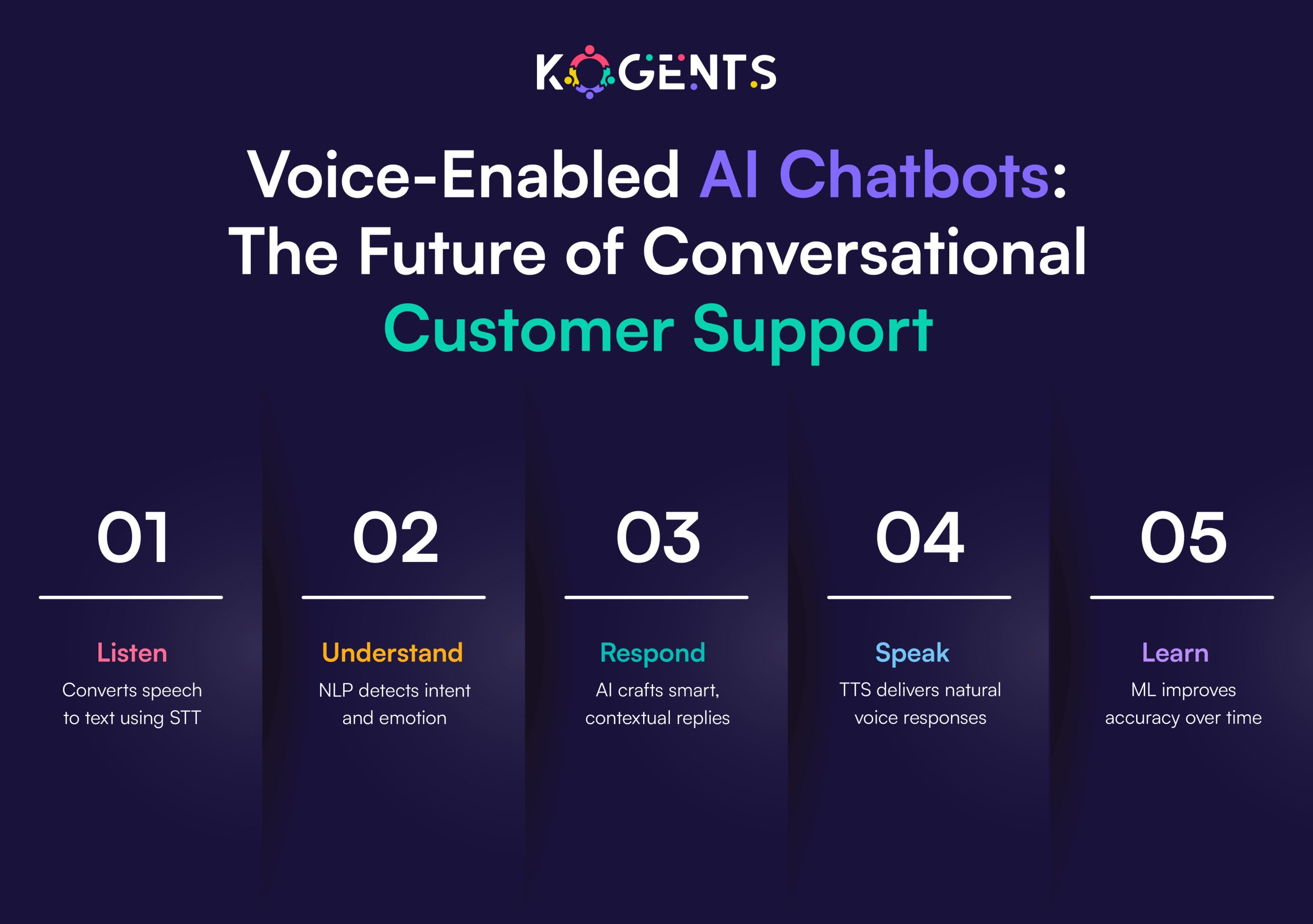
    future of ai chatbots for customer service

    Case Study Spotlights

    1. H&M

    H&M’s chatbot handles order tracking, returns, and styling queries, reducing agent workload by 70%.

    2. Bank of America – “Erica”

    With over 25 million users, Erica automates transactions, balances, and reminders, saving thousands of agent hours monthly.

    3. Sephora

    Sephora’s chatbot provides personalized product suggestions, increasing engagement by 20%.

    4. KLM Airlines

    KLM’s multilingual chatbot halves average response times while maintaining high satisfaction 

    5. Shopify

    Shopify’s Kit chatbot helps solopreneurs manage campaigns, saving 5–10 hours per week.

    Conclusion

    For entrepreneurs and solopreneurs, scaling support doesn’t have to mean scaling staff.

    With AI chatbots for customer service, you can automate repetitive tasks, deliver faster responses, and personalize every interaction, all while keeping costs low.

    AI isn’t here to replace your human touch; it’s here to amplify your impact

    By letting technology handle the routine, you free yourself to focus on what truly matters: building relationships, growing your brand, and creating exceptional customer experiences.

    At Kogents.ai, we make this transformation effortless. Our intelligent chat solutions help you scale smarter, serve better, and grow faster, without adding extra hands to your team.

    FAQs 

    What are AI chatbots for customer service?

    They’re intelligent virtual assistants that automate customer interactions using AI, NLP, and machine learning.

    How do they improve operations?

    By automating ticketing, FAQs, and routing, they cut response times and reduce agent workloads.

    Are they replacing humans?

    No, they augment human agents by handling routine inquiries.

    Which industries benefit most?

    E-commerce, SaaS, healthcare, finance, and education.

    Are AI chatbots secure?

    Yes, enterprise-grade chatbots use encryption and comply with GDPR and ISO standards.

    What’s the ROI?

    Up to 60% cost reduction and 35% higher CSAT within six months of deployment.

    Can they handle multiple languages and voice?

    Absolutely, most modern bots are multilingual and voice-enabled.

    How do they differ from rule-based bots?

    AI bots learn and adapt; rule-based bots rely on static scripts.

    How do I install one?

    Platforms like Ada, Intercom, and Yellow.ai offer plug-and-play website integration.

    What’s next for AI chatbots?

    Generative AI will evolve bots into autonomous, context-aware digital employees.

  • Harnessing Conversational AI for Customer Service to Enhance AI Automation

    Harnessing Conversational AI for Customer Service to Enhance AI Automation

    What if your business could speak to every customer,  instantly, intelligently, and empathetically, without hiring an extra team member?

    That’s the power of conversational AI for customer service, a technology redefining how entrepreneurs and solopreneurs engage with their customers. 

    We live in such a time where every second counts, and experiences drive loyalty. AI is no longer a futuristic concept but the new foundation of business agility.

    Unlike traditional chatbots that simply respond, AI-driven customer support conversations understand. 

    They interpret intent, recall context, and adapt tone, offering customers not just information, but connection.

    Whether it’s a solo founder running a coaching business or a scaling startup managing thousands of requests, conversational AI transforms every interaction into a strategic opportunity.

    By blending machine learning (ML), natural language understanding (NLU), and large language models (LLMs), modern customer-service conversational AI solutions are automating support in ways that feel remarkably human.

    They don’t just answer questions but build trust, streamline operations, and free founders to focus on what truly matters: growth, innovation, and meaningful engagement.

    Welcome to the next era of AI automation, where conversation becomes your competitive advantage.

    Key Takeaways

    • Conversational AI for customer service bridges empathy and efficiency, transforming support from reactive to predictive.
    • Entrepreneurs and solopreneurs can achieve enterprise-grade CX without expanding teams.
    • Integration with knowledge bases, CRM, and analytics drives measurable ROI.
    • Ethical, emotionally intelligent AI ensures automation doesn’t lose the human touch.
    • The future lies in hybrid collaboration, multilingual fluency, and real-time personalization.

    The Rise of Conversational AI in Customer Service

    It isn’t new, but its sophistication in 2025 is unprecedented. 

    Fueled by machine learning (ML), natural language generation (NLG), and sentiment analysis, these systems have evolved from rule-based bots into AI-driven conversational agents that understand, reason, and engage.

    According to Gartner, Agentic AI Will Autonomously Resolve 80% of Common Customer Service Issues Without Human Intervention by 2029.

    From voice-enabled assistants to multichannel conversational AI for support, organizations are blending human warmth with digital precision. 

    The result? A new era of omnichannel support, where every customer feels heard, even without a human agent on the other side.

    Why Entrepreneurs and Solopreneurs Need Conversational AI

    For entrepreneurs, time is currency. For solopreneurs, it’s survival.

    Managing leads, nurturing relationships, and responding to inquiries can drain resources. 

    That’s where conversational AI for customer support becomes a superpower. Imagine automating 70% of common customer interactions while still sounding authentic and personalized.

    Top benefits include:

    • Lower operational costs: Replace high call volume with scalable AI chatbots for customer service
    • 24/7 customer engagement: No downtime, no delays.
    • Consistent customer experience (CX): Every user gets a timely, accurate response.
    • Improved first contact resolution (FCR): Intelligent routing and context memory.
    • Scalable personalization: AI learns from user behavior, delivering contextual, human-like experiences.

    Note: For startups or small clinics, virtual agents for customer service mean scaling without hiring additional staff. They don’t just respond, they remember, analyze, and improve continuously.

    Case Study Spotlight

    Case Study 1: Boutique eCommerce Brand Increases Conversions by 35%

    A sustainable fashion startup integrated a conversational virtual assistant for support that handled order tracking, returns, and personalized recommendations. 

    Within three months, customer queries dropped by 50%, and conversion rates rose by 35%. The AI agent’s ability to recall preferences made every interaction feel “human,” driving stronger brand loyalty.

    Case Study 2: Healthcare Solopreneur Enhances Patient Experience

    A private health practitioner deployed an AI voice bot for customer service to automate appointment scheduling and pre-consultation FAQs. 

    This solution not only saved 12 hours weekly but also improved patient satisfaction scores by 25%. The system’s multilingual capability bridged accessibility gaps, fostering inclusivity.

    Case Study 3: Enterprise Telecom Transforms Support with Omnichannel AI

    A global telecom provider rolled out a customer support conversational platform across chat, email, and voice. 

    The platform achieved 24/7 coverage, reduced average handle time (AHT) by 38%, and increased FCR by 29%. 

    Integration with CRM and knowledge base systems enabled seamless human-agent hand-offs, a true hybrid success.

    Case Study 4: Fintech Startup Cuts Onboarding Time by 45%

    A digital banking startup integrated AI chatbots for customer service to guide users through account setup and verification. 

    Leveraging intent recognition and NLG, the AI clarified KYC processes and resolved common login issues.

    Result: onboarding time dropped from 8 minutes to 4.4 minutes, while customer satisfaction (CSAT) soared to 92%.

    The system also flagged potential compliance anomalies, saving the company from regulatory pitfalls.

    Case Study 5: EdTech Company Personalizes Learning Support

    An EdTech platform serving global learners introduced AI-driven customer support conversations to handle course inquiries and tech assistance. 

    The chatbot, powered by LLMs and sentiment analysis, adapted tone for students versus instructors.

    Support requests fell by 55%, freeing human agents to focus on pedagogy. 

    More importantly, NPS (Net Promoter Score) improved by 18%, reflecting higher user satisfaction and trust.

    The Core Technologies Powering Conversational AI

    Behind every automated conversational agent for customer service, including the best AI agents for customer support, lies an intelligent architecture driven by interconnected technologies:

    1. Natural Language Understanding (NLU): Deciphers customer intent and emotion.
    2. Natural Language Generation (NLG): Crafts human-like responses.
    3. Machine Learning (ML): Continuously learns from interactions to improve accuracy.
    4. Large Language Models (LLMs): Deliver contextual, dynamic conversations across industries.
    5. Sentiment Analysis: Detects emotional tone to adapt empathy levels.
    6. Knowledge Base Integration: Enables factual, on-brand responses.
    7. Workflow Automation: Orchestrates back-end processes like ticket creation or billing.
    8. Omnichannel Orchestration: Synchronizes conversations across chat, voice, social, and email seamlessly.

    Note: Together, these technologies empower customer service chatbot AI to act as intelligent digital assistants, ones that can understand nuance, not just keywords.

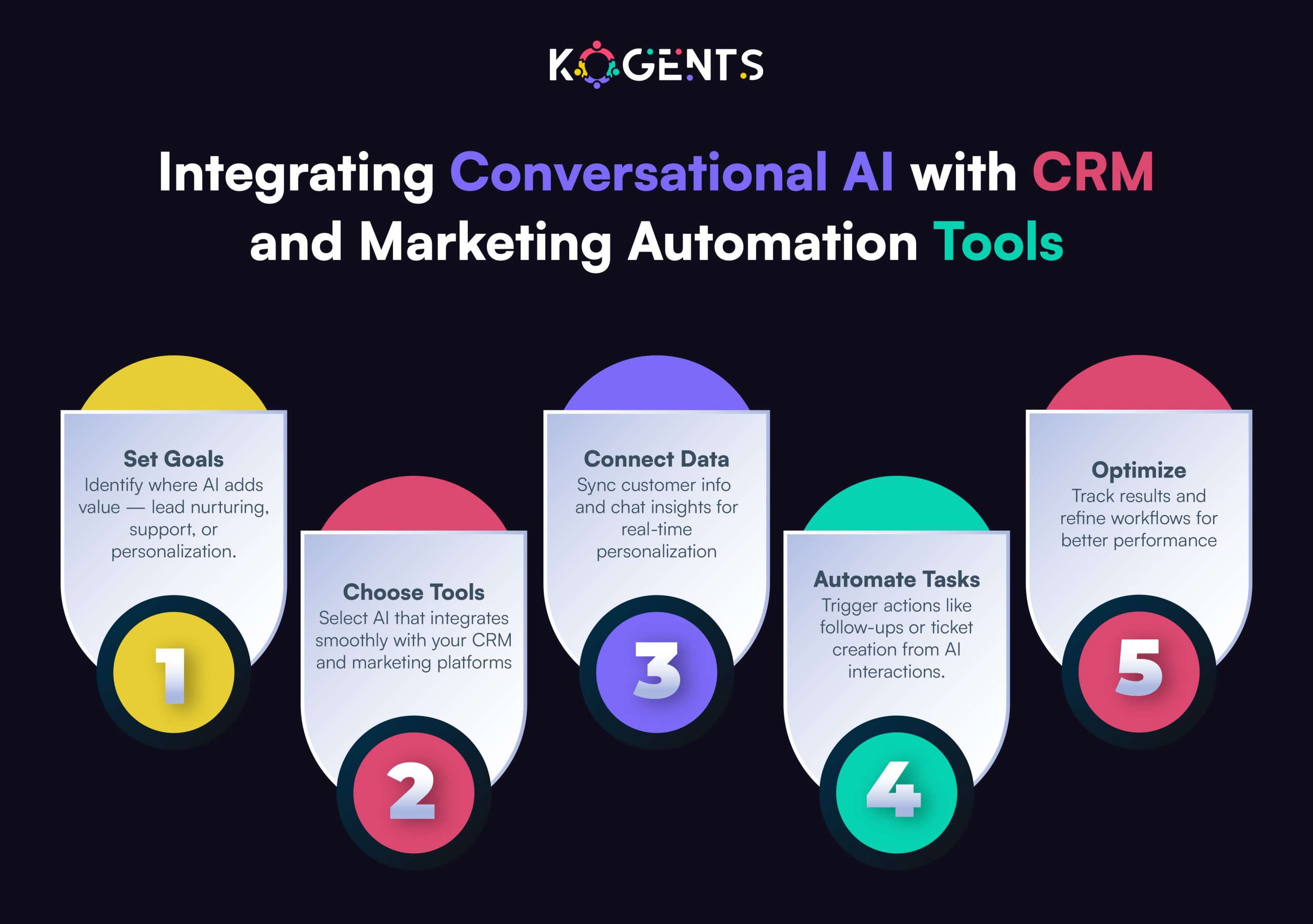
    conversational ai with crm and marketing automation

    Business Impact: Quantifying ROI and Competitive Advantage

    According to Forrester’s 2024 Customer Experience Benchmark, companies that implemented AI chatbots for customer service saw:

    • Customer-obsessed organizations reported 41% faster revenue growth
    • 49% faster profit growth
    • 51% better customer retention

    ROI Snapshot

    Metric Before AI After AI Change
    FCR (First Contact Resolution) 68% 88% +20%
    AHT (Average Handle Time) 6.5 min 4.1 min -37%
    CSAT (Customer Satisfaction) 78% 91% +13%
    Operational Cost 100% baseline 72% -28%

    Beyond numbers, AI automation delivers strategic leverage. It transforms reactive support into predictive customer engagement, where AI anticipates needs before customers even articulate them.

    Implementation Framework for Entrepreneurs

    An implementation framework designed specifically for entrepreneurs and solopreneurs who want to embrace conversational AI effectively.

    Phase 1: Diagnose & Define

    • Identify repetitive queries (FAQs, order tracking, appointment booking).
    • Analyze response time and ticket types.
    • Define success metrics, CSAT, FCR, or resolution speed.

    Phase 2: Design Conversational Flow

    • Build AI personas aligned with your brand tone.
    • Integrate knowledge base content and existing CRM data.
    • Map customer journey touchpoints for seamless automation.

    Phase 3: Deploy & Integrate

    • Use platforms like Kogents.ai  for easy integration with messaging apps, voice assistants, or websites.
    • Implement human-agent hand-off for complex queries.
    • Ensure data security compliance (ISO 27001).

    Phase 4: Optimize & Scale

    • Track metrics like intent recognition accuracy and deflection rate.
    • Use machine learning feedback loops to refine responses.
    • Expand across languages, regions, and channels for true omnichannel CX.

    Ethics & Responsible AI in Customer Service

    As AI automation grows, ethical concerns become paramount. 

    Conversational AI interacts directly with people, handling personal data, interpreting emotions, and shaping brand perception. Hence, ethical AI isn’t optional; it’s foundational.

    1. Transparency

    • Customers deserve to know when they’re engaging with an AI. 
    • Disclosing this builds trust and prevents deception.

    2. Data Privacy & Security

    • Compliance with GDPR and ISO 27001 ensures that sensitive customer information remains protected. 
    • Vendors like Salesforce and IBM Watson set high standards for data governance.

    3. Fairness & Bias Mitigation

    • AI models can inherit bias from training data. 
    • By using diverse datasets and continuous evaluation, organizations ensure inclusive and equitable interactions, critical in global support operations.

    4. Emotional Intelligence & Empathy

    5. Accountability & Oversight

    • Regular audits, human oversight, and explainable AI systems keep brands accountable for outcomes. 
    • Responsible automation ensures that efficiency never compromises humanity.

    trends in conversational ai for customer service

    Comparison Table: AI Agents vs. Traditional Tools

    Feature / Capability Conversational AI Agent Traditional Chatbot / IVR
    Language Processing Contextual (NLU + LLM) Keyword-based
    Channel Coverage Omnichannel (Chat, Voice, Social) Limited (Chat only)
    Learning Ability Adaptive & Continuous Static scripts
    Response Quality Human-like Rigid
    Integration Scope CRM, Workflow, Knowledge Base Basic FAQ
    Personalization Contextual Memory None
    Analytics Real-time Sentiment, CX Metrics Minimal
    ROI / Efficiency High Moderate

    Future Trends in Conversational AI for Customer Service

    The next three years will redefine how brands use AI-driven customer support conversations. Here’s what’s coming:

    1. Emotionally Intelligent Agents:
      AI that detects frustration, confusion, or satisfaction, adjusting tone and phrasing in real time.
    2. Generative AI Customer Service Agents:
      LLM-powered conversational AI will craft dynamic, human-like responses for complex inquiries, integrating creativity into customer care.
    3. Voice-First Engagement:
      With the rise of smart speakers, AI voice bots will become primary support channels, especially in retail, healthcare, and logistics.
    4. Predictive CX Orchestration:
      AI will anticipate needs, offering solutions before users ask, thanks to behavioral and sentiment analysis.
    5. Multilingual & Cultural Fluency:
      Future self-service conversational AI systems will deliver contextual empathy across languages and cultural nuances.
    6. Human-AI Collaboration Models:
      Instead of full automation, the trend is hybrid; AI handles scale, humans handle sensitivity. The best of both worlds.
    These trends signal a shift from “automation as convenience” to “automation as customer intimacy.”

    Conclusion 

    As the digital era accelerates, the line between automation and empathy continues to blur. The winners will be those who master both.

    For entrepreneurs and solopreneurs, conversational AI for customer service is more than a convenience but a growth strategy. 

    It helps small teams act like enterprises, ensuring every customer feels valued, every message gets answered, and every second counts.

    That’s where Kogents.ai comes in, making AI-driven customer support conversations accessible, scalable, and ethical for businesses of all sizes.

    From setup to analytics, they empower you to deliver 24/7 intelligent support without losing your brand’s personality.

    FAQs

    How is conversational AI transforming customer service in 2025?

    Conversational AI is revolutionizing customer service by merging empathy with automation. Modern AI systems can now interpret intent, recall previous interactions, and adapt their tone, making customer conversations feel natural and personalized. Businesses benefit from faster resolutions, reduced support costs, and improved satisfaction, all while maintaining consistent, human-like engagement across channels such as chat, voice, and email.

    What technologies power conversational AI for customer service?

    Conversational AI combines several intelligent technologies to deliver seamless interactions. Natural Language Understanding (NLU) helps the system grasp meaning and emotion, while it creates fluid, human-like responses. Machine Learning (ML) continuously improves accuracy, and sentiment analysis enables emotional sensitivity. Together, these tools allow AI agents to engage contextually, automate complex workflows, and provide consistent, brand-aligned responses.

    How can small businesses and solopreneurs use conversational AI effectively?

    For small teams, conversational AI is a force multiplier. It automates common inquiries, such as bookings, order tracking, or providing 24/7 engagement without additional staff. By integrating with CRM systems and knowledge bases, it ensures every response is informed and consistent. This balance of automation and authenticity helps solopreneurs scale operations efficiently and focus on core growth areas instead of repetitive support tasks.

    What kind of ROI can businesses expect from implementing conversational AI?

    Businesses that adopt AI-driven customer support typically see measurable gains across several key metrics. Studies show up to a 45% reduction in ticket resolution time, 30% improvement in customer satisfaction, and 25% lower operational costs. Beyond the numbers, conversational AI builds long-term value by predicting customer needs, improving first contact resolution, and freeing human teams to focus on complex or high-value interactions.

    How does Kogents.ai help brands personalize customer interactions?

    Kogents.ai empowers businesses to deliver customer support that feels both intelligent and empathetic. Its conversational AI solutions integrate seamlessly with CRM data and knowledge bases, ensuring every response aligns with a brand’s unique voice. By combining large language models with emotion-sensitive AI, we help companies maintain human connection at scale, turning automation into a true brand differentiator.

  • Integrating a Customer Service Virtual Assistant for Enhanced AI Performance

    Integrating a Customer Service Virtual Assistant for Enhanced AI Performance

    Imagine a scenario where your inbox is overflowing, your chat notifications are blinking red, and your customers are waiting, impatiently, for help. 

    You’re juggling product development, marketing, invoices, and now, support tickets. You’re not just the founder anymore, you’re also the entire customer support automation team.

    Sound familiar? This is the daily reality for countless entrepreneurs and solopreneurs scaling digital businesses in the 21st century.

    And here’s the hard truth: customers expect 24/7, multichannel, instant support. Yet, maintaining a full in-house support team isn’t always financially or operationally feasible.

    That’s exactly where the customer service virtual assistant steps in, not as a replacement for your human touch, but as an intelligent extension of it.

    A virtual assistant for customer service (or remote customer service assistant) isn’t just someone answering emails from across the world. 

    It’s a trained, tech-empowered professional, or AI-augmented partner, who embodies your brand voice, integrates with your CRM system, manages your ticket management system, and ensures your customer experience (CX) is never compromised, even when you’re asleep.

    Think of them as your silent growth partner, someone who keeps your clients happy while you focus on vision, innovation, and strategy.

    As the era of AI-driven business operations unfolds, integrating a customer-service VA is no longer a convenience but a necessity for survival and scalability.

    In this in-depth guide, we’ll explore how entrepreneurs and solopreneurs can seamlessly integrate a virtual customer service assistant to enhance both AI performance and overall operational excellence. 

    Key Takeaways 

    • You’ll understand how a virtual customer support assistant bridges human and automated service to elevate CX.
    • We’ll unpack performance metrics (first-call resolution, SLA adherence, CSAT/NPS) and help you measure your ROI.
    • You’ll see how to train, onboard, and manage remote support specialists and integrate them into your workflow.
    • Two credible case studies will show concrete outcomes of deploying VAs and AI-augmented agents.
    • You’ll gain pro-tips and an operational table to guide execution and monitoring.

    Why Integrate a Customer Service Virtual Assistant?

    When we talk about the customer service remote virtual assistant, we’re covering a broad spectrum: from human VAs working remotely from home-office setups, to AI chatbots, to hybrid models combining human flexibility with AI efficiency. 

    Let’s break down why this matters for entrepreneurs and solopreneurs.

    1. Cost-effectiveness & Scalability

    Case in Point: A case study noted that virtual assistants in customer service noted that up to 60% of professionals reported time savings from AI deployment, with routine queries handled up to 80% by chatbots.

    2. Enhanced Customer Experience Automation(CX)

    3. Multichannel, 24/7 support & first contact resolution

    • A virtual assistant customer support setup can handle inquiries across chat, email, phone, or social channels. 
    • When integrated with your ticket management system, AI tools, and knowledge base, you achieve faster turnaround and improved first contact resolution
    • This translates into stronger CSAT, shorter cycle times, and better brand reputation.

    4. Freeing up the entrepreneur’s time

    • As a solopreneur, your time is the scarcest asset. Offloading “mundane” yet essential tasks (customer queries, simple tickets, live chat triage) means you can invest in growth, innovation, partnerships, and still know your customers are cared for. 
    • A remote or outsourced VA becomes a force multiplier for you personally.

    5. Competitive differentiation

    • Today’s customers evaluate support just as much as product. Offering seamless, intelligent, human-like support, even via remote assistants, creates a competitive edge. 
    • Especially in digital, subscription, or service-driven businesses, a customer support virtual assistant can elevate your brand.

    customer service virtual assistants

    Types of Customer Service Virtual Assistants & Integration Models

    When considering a customer-service VA, you’ll want to evaluate the model that fits your business. Below are common types:

    Human Remote VA

    • A remote human assistant working from home or through a specialist agency.
    • Handles chat, email, phone, social response, and uses tools like a CRM system or knowledge base creation.
    • Ideal when nuance, empathy, and complex problem-solving are required.

    AI / Automated Virtual Agent

    • A purely AI-driven assistant: chatbot, voice-bot, or hybrid. Integrates with ticket management systems, IVR, and excels at handling repetitive inquiries.

    Studies show that up to 85% of customer interactions can be handled by AI in retail contexts.

    • Great for high-volume, low-complexity inquiries, and 24/7 availability.

    Hybrid Model (Human + AI)

    • Combines AI assistants for routing or initial triage + human remote assistants for escalation and nuanced support.

    Leverages strengths of both: AI for speed & scale, human for empathy & escalation.

    Outsourced Virtual Assistant Service

    • You contract an external agency specializing in outsourced customer service virtual assistant” services.
    • The agency handles recruiting, onboarding, SLA management, tools, compliance, and you integrate them with your brand voice and systems.

    In-house Remote VA Team

    • You directly hire remote VAs (or a remote workforce) and manage them internally: training, KPIs, brand alignment.
    • Higher control, higher management burden, but closer alignment with your brand.

    Key Performance Indicators (KPIs) for Customer Service Virtual Assistants

    Here’s a tabular summary of critical metrics to track when deploying a virtual assistant customer support system:

    KPI Why It Matters Target / Benchmark
    First Contact Resolution (FCR) Higher FCR means fewer repeat contacts & happier customers 70-80%+ in mature services
    Customer Satisfaction (CSAT) Direct measure of customer feeling about the interaction 80%+ is often considered good
    Net Promoter Score (NPS) Measures loyalty & willingness to recommend your brand +30 to +50+ in strong support scenarios
    Average Handle Time (AHT) Efficiency of each interaction Lower is better, but not at the cost of quality
    SLA Compliance Rate Meeting agreed on response/resolution time 90-95%+ in many customer-centric orgs
    Cost per Ticket / Interaction Cost efficiency of the support model Significantly lower than in-house
    Ticket Backlog / Queue Time Ability to manage incoming volume Low queue times = better experience
    Escalation Rate % of contacts needing escalation Lower indicates good initial resolution
    Self-Service Deflection Rate % of issues resolved via knowledge base/automation Higher = lower human load

    Case Studies

    Case Study 1: Large-Scale IT Service Desk – Virtual Assistant Boosts CX by 60%

    • A multinational energy/oil & gas company adopted a virtual customer service assistant for its internal IT service desk, supporting 22,000 employees. 
    • The AI-augmented assistant managed incidents and service requests via phone, email, and self-service portal. 

    Outcome: CX improved by 60%.

    What this means for you: even in high-volume, complex environments, integrating the right virtual assistant enhances internal support, translating for external customer contexts too.

    Case Study 2: Coaching Business – Remote VA Delivers 279% ROI

    In a coaching business scenario, deploying a human remote VA to handle client administration, email follow-up, and simple support saved 32 hours/week and generated $56,400 net additional revenue from ~$32,800 investment. 

    ROI 279%. 

    What this means for you: as a solopreneur, freeing yourself from time-sucking admin/support tasks via a VA can directly enable new revenue streams or higher-ticket work.

    Case Study 3: AI Virtual Assistant in Retail – Up to 30% Cost Reduction

    In retail, AI virtual assistants (chatbots) were shown to reduce customer service costs by ~30% and handle up to 85% of routine interactions.

    What this means for you: even without a huge scale, you can adopt AI/automated support to lighten the load, with human VA oversight for complex cases.

    Challenges and How to Overcome Them? 

    Deploying a virtual assistant for customer service isn’t plug-and-play. Here are common pitfalls and how to address them:

    Challenge 1: Poor bot design → frustrated customers

    The Sandbank et al. research shows that badly implemented virtual but best AI agents for customer support and performance can spiral into “egregious conversations” and harm CX. 

    Solution: Engage a hybrid model: start with human remote assistants, build a knowledge base, then automate incrementally. Monitor conversations and intervene when quality drops.

    Challenge 2: Integration issues with CRM/help-desk/ticketing systems

    Without efficient integration, your VA becomes a bottleneck rather than a relief.

    Solution: Before launching, map your tools: CRM, ticket system, live chat, and knowledge base. Ensure data flows seamlessly, agents/VA have access to history, and automated routing works.

    Challenge 3: Maintaining brand voice and consistency

    When hiring outsourced or remote VAs, brand tone and quality can vary.

    Solution: Create a strong onboarding/training program: brand voice guide, FAQs, escalation protocol, service charter, and regularly review performance and provide feedback.

    Challenge 4: Data security/compliance

    Remote work, outsourced agents, and multichannel support raise security risks.

    Solution: Ensure compliance with data regulations; use secure tools, access controls, NDA for VAs. Include SLA and security clauses in contracts.

    Challenge 5: Measuring ROI and impact

    Without clear metrics, you won’t know whether your investment is paying off.

    Solution: Set up your dashboard early (see table above). Track time saved, cost per ticket, CSAT/NPS improvements. Re-invest based on data.

    trends in customer service virtual assistant

    Conclusion

    In summary, deploying a customer service virtual assistant is more than a tactical support fix; it’s a strategic shift. 

    You’re transforming how your brand engages with customers: moving from reactive to proactive, from manual to efficient, and from overwhelmed founder to strategic leader.

    The path forward lies in adopting a virtual assistant for customer service model, whether human remote, AI-augmented, or hybrid, that integrates with your ticket management system, leverages multichannel support, aligns with your CRM system, supports first contact resolution, and delivers high CSAT and NPS.

    Measure your results, iterate your processes, train for quality, and keep your brand voice consistent with Kogents.ai by calling us at (267) 248-9454 or emailing us at info@kogents.ai.

    FAQs

    How does a virtual assistant for customer service work?

    The assistant connects to your customer-support infrastructure: live chat widgets, email inboxes, phone lines (via IVR/routing), or social channels. Queries get routed via a ticket management system, the assistant triages, resolves, or escalates issues, and logs interactions in your CRM system. Over time, you build a knowledge base and possibly self-service automation so that the assistant becomes more efficient and requires less human oversight.

    What skills are required for a virtual assistant for customer service?

    Key skills include strong communication (written and verbal), problem-solving, familiarity with CRM systems, live chat or help-desk tools, empathy, ability to follow SLA protocols, multichannel support capability, remote-work discipline, and adaptability as you integrate AI tools or escalate to higher support.

    What’s the difference between a virtual assistant and a live customer-service agent?

    A live-in-house agent typically works onsite, full-time, with direct supervision. A virtual customer-service assistant works remotely, may manage multiple channels and tasks, and often at a lower cost. Importantly: VAs often handle routine or volume tasks (e.g., chat/email triage) while human agents focus on complex/high-value interactions. Efficiency, cost, and flexibility lean toward VAs.

    How do you train a virtual assistant for customer service?

    Training includes: introducing your brand/tone, showing your customer base and typical pain points, onboarding on your tools (CRM, ticket system, live chat), role-playing common inquiries, building familiarity with your knowledge base, defining escalation paths, setting KPIs, and giving feedback loops. Over time, you add advanced training: multichannel support, automation rules, and AI tools integration.

    Remote customer-service assistant vs in-house agent—what’s better?

    For entrepreneurs/solopreneurs, a remote customer-service assistant often wins: lower overhead, flexible hours, access to global talent, and faster scaling. In-house may provide tighter control, cultural alignment, and face-to-face interaction, but costs more and scales more slowly. The best approach: start remote, define workflows, ensure quality, then evaluate whether some in-house presence is needed.

  • Leveraging Customer Support Automation to Drive Operational Efficiency with AI

    Leveraging Customer Support Automation to Drive Operational Efficiency with AI

    In a market obsessed with immediacy, where response time defines reputation, businesses are learning that the key to scalability lies not in more manpower but in customer support automation

    The question isn’t “Should we automate support?”, it’s “How fast can we turn AI into operational advantage?

    Across industries, AI customer service and automated helpdesk software are rewriting the rules of engagement

    Each conversation, ticket, or chat ping is now a data point for optimization, a chance to make operations leaner and smarter

    When companies embed machine learning, natural language processing (NLP), and predictive analytics into their service workflows, they’re not just speeding up resolutions; they’re engineering efficiency.

    AI doesn’t just answer questions; it amplifies operations. It classifies, predicts, routes, and learns

    It turns every customer touchpoint into a micro-optimization loop that drives measurable savings and satisfaction.

    Key Takeaways

    • Organizations using an AI Customer service virtual assistant and automation report lower service costs and drastically reduced response times.
    • Operational efficiency isn’t just cost reduction; it’s smarter routing, faster resolution, and higher satisfaction with the same or fewer resources.
    • Conversational AI for customer support and ticket routing automation now enables 24/7 global assistance across voice, chat, and social channels.
    • McKinsey reports that effective automation can transform support from a cost center into a profit lever when paired with predictive analytics and human-AI collaboration.
    • The future lies in agentic AI ecosystems, self-learning systems that manage, predict, and optimize every customer interaction in real time.

    Leveraging Customer Support Automation to Drive Operational Efficiency with AI

    Why Operational Efficiency Is the True Metric? 

    When businesses deploy automation, the goal isn’t simply to reduce tickets; it’s to optimize operations end-to-end

    Operational efficiency in customer support means achieving faster issue resolution, fewer escalations, higher satisfaction, and lower cost per interaction.

    AI elevates this by introducing intelligence, prediction, and adaptability into every customer interaction. For example:

    • AI-based ticket routing eliminates manual triage, ensuring every request reaches the right expert instantly.
    • NLP chatbots handle most queries autonomously while gathering insights for continuous optimization.
    • Predictive analytics anticipates high-volume periods, staffing needs, and emerging issues before they impact service.
    • Generative AI co-pilots summarize conversations, assist agents in real time, and maintain consistency in tone and compliance.

    The result? Shorter average handle times (AHT), fewer backlogs, and an empowered workforce and operational efficiency aren’t theoretical anymore; it’s quantifiable.

    McKinsey (2025) found that companies integrating AI into support operations saw a 30% improvement in productivity and up to 50% faster resolution times when automation was embedded into core workflows, not just layered on top.

    Strategic Framework for Leveraging AI-Driven Support Automation

    A global survey found that more than 80% of companies using AI see limited gains because they remain stuck in pilot mode.

    Instead of “how to build a strategy,” this section now becomes a practical framework for scaling efficiency.

    1. Automate Intelligently, Not Excessively

    • Identify tasks that waste agent time, password resets, order updates, tracking requests, and automate those first. 
    • Avoid “over-automation” where empathy or judgment are crucial.

    2. Design for Human-AI Collaboration

    • The best models don’t replace people, they grow them. 
    • Integrate AI co-pilots that suggest responses, analyze sentiment, and route conversations dynamically.

    3. Data-Driven Workflow Orchestration

    • Use predictive support analytics and CRM integration to pre-empt customer pain points. 
    • Efficiency emerges when AI predicts issues, not just reacts to them.

    4. Measure What Matters

    • Don’t just track resolution time.
    • Focus on measuring AI impact KPIs: automation rate, CSAT delta, sentiment improvement, agent efficiency, and customer lifetime value (CLV) impact.

    5. Create Continuous Feedback Loops

    • Build closed-loop systems that refine automation models weekly. 
    • Feed real-world chat data, NPS comments, and agent insights back into NLP models.

    generative ai in customer support automation

    Expanded Vendor & Tool Landscape

    The AI customer support ecosystem has matured rapidly. Here’s how top platforms stack up and where they shine:

    Vendor Core Strengths Ideal For
    Zendesk AI Deep integration, advanced routing automation, sentiment tracking Mid-to-large enterprises needing full CRM integration
    Freshdesk AI Strong ticket automation, affordability, and easy setup SMBs seeking quick automation wins
    Intercom Fin AI Personalized conversational AI, co-pilot for agents SaaS & B2B businesses focused on proactive engagement
    Salesforce Einstein Service Predictive insights, end-to-end CRM + AI Enterprises wanting a unified data & automation stack
    Ada CX Multilingual AI bots, high automation percentage (up to 84%) Global B2C brands, e-commerce
    Yuma AI Shopify & e-commerce ticket automation High-volume online stores
    IBM Watson Assistant Enterprise-grade NLP and voice integration Regulated industries, banking and healthcare

    Operational Efficiency with AI: Metrics that Matter

    Operational efficiency driven by AI is a systemic transformation, not just faster chats. It requires synchronizing technology, data, and people.

    Metric Traditional Model AI-Driven Automation Efficiency Gain
    Average Handle Time (AHT) 6–8 min 2–3 min ↓ ~60%
    Cost per Contact $7–$12 $2–$4 ↓ ~65%
    First-Contact Resolution 60–70% 85–90% ↑ ~25%
    Agent Productivity 100 tickets/day 160+ tickets/day ↑ ~60%
    CSAT / NPS 70% avg. 85–90% ↑ ~20%

    Learn Business Benefits

    When done well, customer care automation delivers tangible benefits:

    • Cost reduction: Many firms report significant reductions in support costs by automating routine interactions.
    • Faster response times: Automations can respond instantly and route queries faster than manual triage.
    • Scalability: Automation handles peak loads, 24/7 availability, globally across time zones.
    • Improved satisfaction: Customers appreciate fast resolution and accurate responses, boosting CSAT/NPS.
    • Agent productivity: Freeing human agents from repetitive tasks lets them focus on complex, value-added work.
    • Data insights & proactive support: Automation platforms generate rich data (ticket types, root causes, sentiment), enabling continuous improvement and proactive outreach.
    • Brand differentiation & CX leadership: Offering responsive, personalized support sets brands apart in a competitive market.

    Insightful Key Challenges and Risks

    However, the path to effective automation is fraught with pitfalls:

    • Poorly designed bot experiences: If the bot misunderstands intent, gives generic responses, or can’t escalate properly, customer frustration rises.
    • Over-automation: Trying to automate everything (including emotional, complex interactions) can degrade CX. 

    As one McKinsey study noted, human interaction still matters, especially for empathy and connection.

    • Siloed systems / weak integration: Without deep CRM integration, knowledge base updates, and omnichannel reach, automation will underperform.
    • Governance, compliance, privacy: Automated systems must adhere to standards like GDPR, ISO 9001, SOC 2; data security and privacy are non-negotiable.
    • Change management: Agents may resist automation; roles evolve; training and culture shift are essential.
    • ROI uncertainty: Many organizations are still not capturing the full value of AI automation.
    • Maintenance & continuous improvement: Automation isn’t “set and forget”. Knowledge bases must be updated, models retrained, routing rules refined, and feedback loops built.

    ai driven customer support automation

    Case Studies: Real-World Deployments of Customer Support Automation

    Case Study 1: Global Sleep Brand – Simba Sleep

    Simba Sleep deployed an AI agent via the platform Ada and achieved 84 % automated resolution across channels. 

    Outcome: Faster replies, 24/7 coverage, consistent CX globally; support operations scaled without proportional headcount increases.

    Insights: Strong self-service and proactive escalation workflows enabled high automation rates while maintaining brand tone.

    Case Takeaway: High automation rates are achievable with solid design and a knowledge base strategy; the brand’s voice and escalation handoff matter.

    Case Study 2: Banking / Credit-Union Use-Case

    The credit-union scenario: A financial services organisation used gen-AI to automate routine note-taking, summarisation of interactions, and routing of simple requests. 

    It improved and personalised customer contact, boosted agent capability, and automated routine processes. 

    Business impact: Freed agents for more value-added service, improved accuracy and turnaround time, enhanced compliance and tracking.

    Case Takeaway: In regulated industries, automation isn’t just about cost and speed; it’s also about compliance, consistency, and data integrity.

    Case Study 4: E-Commerce Support Scaling with AI – EvryJewels

    EvryJewels used the platform Yuma AI to automate 89% of tickets, cut response times by 87.5%, and reduce cost burdens.

    Notes: High ticket volumes are typical in e-commerce, requiring scalable automation; self-service and AI chatbots enabled growth without proportional cost increase.

    Case Takeaway: For high-volume consumer brands, automation is a growth enabler, not just a cost-reducer.

    Automation Power Moves 

    Automate the mundane, elevate the meaningful: Let AI handle repetition, your humans handle relationships.

    Every ticket is a dataset: Feed it back to improve models weekly, and data is your efficiency multiplier.

    Build for escalation, not elimination: Great automation knows when to hand off.

    Treat AI as your operations analyst: Make it audit your workflows, not just power them.

    Speed without empathy kills loyalty: Always pair automation with emotional intelligence; that’s the human edge.

    Train AI like you onboard agents: Tone, policy, and empathy matter as much as accuracy.

    Reinvest efficiency savings: Every dollar saved from automation should fuel CX innovation; that’s where leadership emerges.

    Conclusion 

    Brands that master customer support automation will outpace competitors not just in response time, but in adaptability, insight, and loyalty.

    From chatbots to predictive analytics, automation is redefining service as an intelligent, self-optimizing system.

    The question is no longer why automate; it’s how far can your AI go? Harness it, scale it, and watch your operations evolve from reactive support to strategic efficiency.

    But do you want to get in touch with the best AI agents for customer support at Kogents.ai to help you out? Reach out to us at (267) 248-9454 or email us at info@kogents.ai

    We specialise in AI-driven customer support automation that doesn’t just deploy a chatbot, but redesigns your support ecosystem end-to-end. 

    As we emphasize and make your customer support AI function a driver of operational efficiency, not a cost.

    FAQs 

    How does AI improve customer service and support?

    AI improves support by enabling virtual assistants, conversational AI for customer support, and support ticket management systems to handle frequent inquiries, understand natural language (via NLP chatbots), analyse sentiment, route tickets intelligently, and free human agents to focus on complex tasks. This boosts speed, accuracy, and scalability. 

    What are the benefits of automating customer service?

    Key benefits include: cost savings, faster response/resolution times, higher agent productivity, improved customer satisfaction (via better CX), scalability across channels, and richer analytics for proactive support.

    How does ticket routing automation and CRM integration fit into support automation? 

    The backbone of effective support automation lies in correctly classifying and routing tickets (ticket routing automation). When integrated with the CRM, automation systems can access customer data, prior cases, value segments, and route the query to the appropriate automation path or agent. This ensures contextually rich responses, faster first-contact resolution, and a consistent omnichannel experience.

    How can I buy customer support automation software for my business?

    Start with vendor short-listing (based on channel support, languages, integration, case studies). Request demo/trial, define pilot scope (e.g., chat automation for one product line). Evaluate KPIs during pilot. Negotiate subscription model, SLA, and support. Key steps: align internal stakeholders (IT, support team, CX, compliance), define budget, set timeline, pilot, scale.

    What are the main risks or cons of automated customer support?

    Risks include: poor customer experience if bots fail or misunderstand intent, over-automation that removes human empathy, weak integration causing context loss, non-compliance with data regulations, lack of change-management causing agent resistance, and low ROI if the pilot remains isolated.

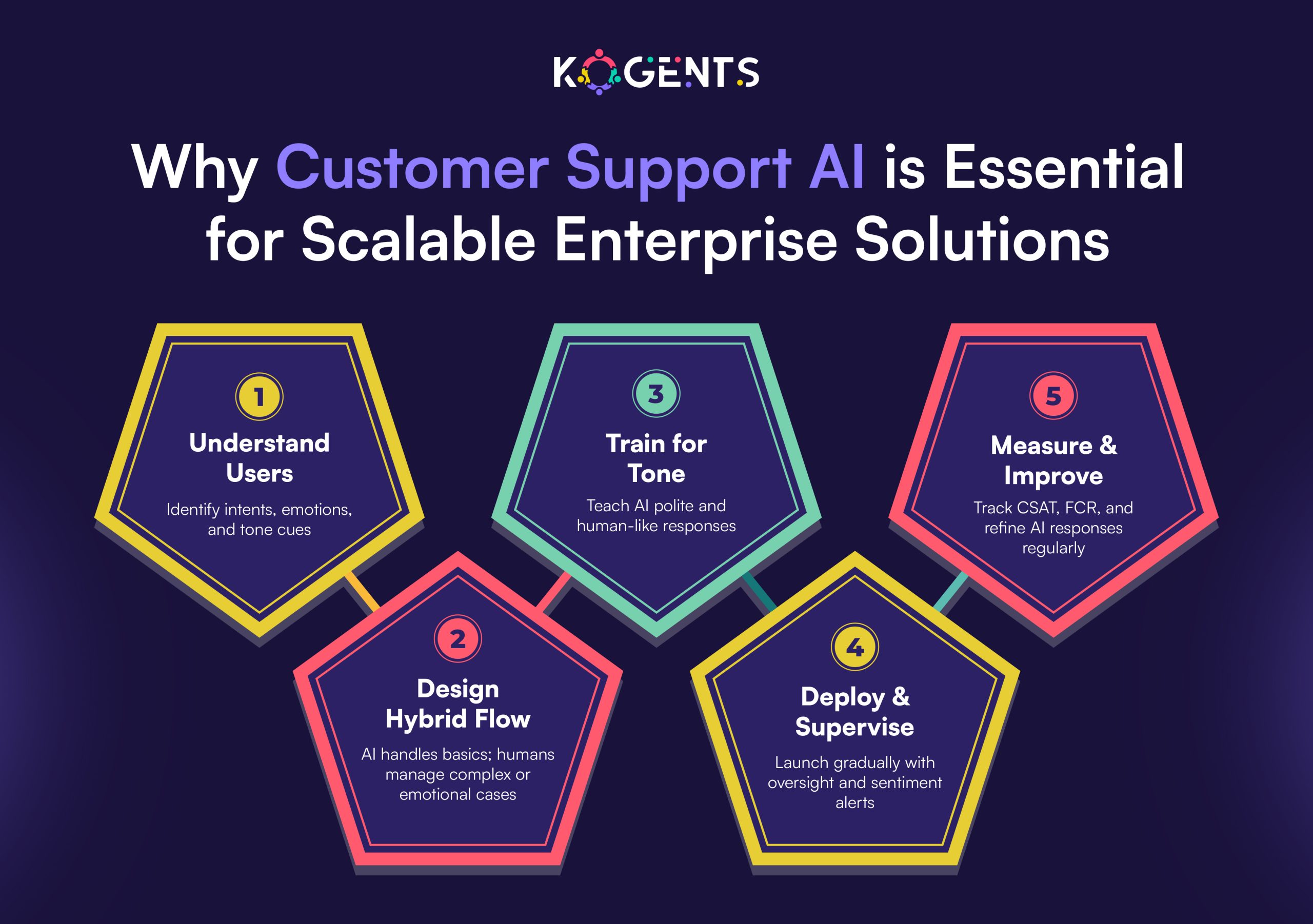
  • Why Customer Support AI is Essential for Scalable Enterprise Solutions

    Why Customer Support AI is Essential for Scalable Enterprise Solutions

    You must be fully aware of the fact that enterprises face mounting pressure to deliver seamless and high-quality service at scale. 

    But with the advent of boldface Customer Support AI, it is a game-changer, transforming how businesses operate. 

    This isn’t just about deploying a chatbot or automated FAQ system but about embedding a truly AI-powered customer support platform across channels, using conversational AI for customer support, virtual agent technology, and self-service AI support solutions

    For enterprise organisations aiming to scale without compromising customer experience, the question is no longer whether they should adopt AI for customer support but how quickly and how effectively they will.

    Think of a scenario where your support team handles thousands of incoming queries across chat, email, and voice

    Traditional models buckle under volume, complexity, and expectation. But with automation, workflow automation, ticket routing guided by predictive analytics in support, and machine learning–driven triage, you get both speed and scale

    Metrics like first-call resolution (FCR), customer satisfaction (CSAT), and mean time to resolution (MTTR) start to shift in your favour. 

    Here’s how you will know! 

    According to research by Cisco, up to 68% of all customer service and support interactions with technology vendors will be handled by “agentic AI” within three years.

    Key Takeaways

    • Enterprises cannot scale customer support effectively without leveraging AI-driven automation and intelligent virtual agents.
    • Customer Support AI empowers both self-service and assisted-service models, enabling customers to help themselves and guiding agents when needed.
    • Metrics such as FCR, MTTR, and CSAT directly benefit when AI is woven into the support workflow and ticket management ecosystem.
    • Adoption must include human-AI collaboration (not AI vs human) and robust governance frameworks to ensure trust, accuracy, and compliance.
    • Selecting the right platform (AI customer service automation, AI-powered customer support platform) and implementing it well is the differentiator between success and costly failure.

    customer support ai empowers

    Why Customer Support AI Matters for Scalable Enterprise Solutions? 

    Addressing Volume & Complexity at Scale

    Large enterprises handle huge volumes of inbound queries across voice, chat, email, social, etc. 

    Traditional models choke under peak load, long wait times, fragmentation, and high cost per contact. With AI for customer support, an intelligent layer can:

    • Use natural-language processing (NLP) and machine-learning support to classify intent, triage issues, route tickets, and escalate appropriately.
    • Empower self-service portals and chatbot/virtual agent solutions to absorb routine requests, deflecting a significant portion of tickets.
    • Provide knowledge-base AI that surfaces correct answers to agents or customers instantly, reducing resolution time.

    Delivering Consistent 24/7, Omnichannel Support

    Customers expect support any time, any channel, seamlessly. Enterprises must provide omnichannel support, meaning the same experience whether via chat, voice bot, email, or social DM. 

    AI-driven customer support enables:

    • Automated 24/7 live chatbots and voice bots that handle initial interactions, so human agents aren’t bound by business hours.
    • Ticket routing and workflow automation that ensures no query falls through the cracks.
    • Enhanced customer experience, contributing to higher CSAT and reduced MTTR.

    Enhancing Efficiency, Reducing Costs

    Enterprise scale means cost management is critical. Customer service AI helps drive efficiency by:

    • Deflecting routine queries thereby reducing manual workload. 
    Example: A case study noted a 43% ticket deflection rate using support AI.
    • Decreasing average handling times, reducing agent onboarding/training overhead thanks to AI-assisted agents.
    • Improving first-call resolution (FCR) via accurate knowledge retrieval and predictive routing.
    • Ultimately delivering a return on investment (ROI) via cost savings + improved customer retention.

    Improving Customer Experience & Loyalty

    Scalable support doesn’t mean sacrificing personalisation, quite the opposite. AI enables personalisation at scale:

    • Sentiment analysis and real-time feedback to prioritise unhappy customers or escalate proactively.
    • AI can remember prior interactions (via conversational memory) and surface context, so the customer doesn’t repeat themselves.
    • The combination of AI + human support enableshumans for empathy, machines for efficiency”. 

    Key Note: Through better experiences, enterprises can improve their Net Promoter Score (NPS) and reduce churn.

    Enabling Data-Driven Insights & Continuous Improvement

    Customer Support AI isn’t just a tool for cost reduction; it becomes a strategic asset. With the right platform:

    • You capture rich data: agent performance, customer sentiment, path-to-resolution, and  FAQ gaps.
    • Use predictive analytics to support identifying emerging issues, optimise staffing, and allocate resources dynamically.
    • Use generative AI and agent assist tools to continuously improve the knowledge base, reducing MTTR over time.

    How to Implement Customer Support AI in an Enterprise Setting? 

    Implementation Roadmap:

    • Define Use-Cases: Start with high-volume, low-complexity interactions (e.g., FAQs, password resets), then scale to more complex workflows using AI.
    • Select platform: Choose an “AI-powered customer support platform” that supports conversational AI, integrates with ticketing systems, CRMs, and knowledge bases, and allows for virtual agent deployment.
    • Data & Integration: Ensure your CRM, support ticketing system, knowledge base, and customer interaction history are well integrated. Knowledge base AI depends on high-quality data.
    • Human-in-Loop Governance: While customer experience automation can handle routine tasks, human agents should oversee complex queries, ethical compliance, and continuous improvement. Establish clear escalation paths.
    • Metrics & KPIs: Track key support metrics like CSAT, FCR, MTTR, cost per contact, ticket deflection rate, and automation rate.
    • Continuous Learning & Feedback: Incorporate feedback loops where AI improves (via ML, RAG frameworks) and agents contribute knowledge back. 
    A recent study highlighted an “Agent-in-the-Loop” framework that improved precision and recall in support systems.
    • Governance & Compliance: AI in support must respect data privacy (GDPR, etc), ensure transparency, eliminate bias, and maintain human oversight. 

    Want to Scale & Optimise? Deploy across channels, geographies, and languages, and then optimise workflows, expand the knowledge base, and refine ticket routing based on AI-driven insights.

    Key Metrics Before vs After Customer Support AI Implementation

    Metric Pre-AI Implementation Post-AI Implementation (Target)
    Self-service / Ticket Deflection Rate ~10–20% 40–50%+
    Average Handling Time (AHT) e.g., 12 mins e.g., 7–8 mins
    First Call Resolution (FCR) 65–70% 80%+
    Customer Satisfaction (CSAT) 78% 85%+
    Cost per Contact High 20–30% reduction

    Relevant Case Studies

    Here are credible, non-repetitive case studies aligned with Customer Support AI in enterprise contexts:

    Best Buy (with Accenture & Google):

    • Best Buy implemented generative AI in its support function, virtual assistants for customers, AI tools for employees, and integrated generative AI in customer service workflows. 
    • They aimed to make interactions more convenient, personalised, and scalable. 

    Result Insights: The self-service customer service virtual assistant handles order changes, software subscriptions, and customer queries; agents use AI suggestions, real-time guidance, and sentiment detection.

    Vodafone – SME / enterprise hybrid:

    • It faced fragmented data across multiple customer-service systems, which caused long wait times. 
    • They used a chatbot built on IBM Watson Assistant to unify search across contract, pricing, and support. 

    Results: Improved agent access to data, faster resolution, and higher support-centre efficiency.

    Motel Rocks – Brand case

    • While smaller than a multinational enterprise, this example demonstrates the impact of customer service AI
    • Ticket deflection by 43%, a 50% reduction in ticket volume through self-service, and CSAT up by 9.4%

    Lessons: Even brands with limited resources can deploy chatbots + sentiment analytics to move the needle.

    Telstra – Telecom provider

    • It incorporated Microsoft Azure OpenAI Service to build “Ask Telstra,”.
    • This summarised customer history and provided answers to agents in seconds via NLP retrieval.

    Impact: Agents spend less time context-switching, resolution times improve, and customer experience is boosted.

    Challenges & How to Overcome Them

    While the upside is compelling, enterprise adoption of Customer Support AI has pitfalls:

    • Data quality & silos: If knowledge base and interaction data are fragmented, AI performance suffers. Overcome by centralising systems and cleaning data.
    • Governance, ethics & bias: Poorly implemented AI can lead to wrong advice, customer frustration, or regulatory issues. Rigorous oversight, transparency, and human-in-loop feedback are required.
    • ROI delays & hype: Not every AI project delivers immediate value. 

    A recent report from Gartner warns that over 40% of “agentic AI” projects will be scrapped by 2027.

    • Customer trust & “AI vs human” anxiety: Customers still value human interaction. The hybrid model (AI + human) is essential. 

    Why Over-automation Is A Risk? Automating too much without human fallback may degrade experience (e.g., chatbot “doom loops” in finance).

    customer support ai is essential

    Know How AI is Redefining the Future of Customer Support?

    Agentic AI: Autonomous best AI agents for customer support are capable of decision-making and taking action with minimal human input 

    Example: the Cisco report predicts 68% of interactions will be handled by agentic AI by 2028.

    Generative AI + LLMs: Use of large language models for summarisation, response generation, agent assist, and knowledge generation.

    Emotion-aware AI / Sentiment analysis: AI is able to detect customer mood and adjust the support path accordingly.

    Hyper-personalisation at scale: AI using large data sets to tailor support interactions to individual customer profiles, context, and history.

    Proactive support / Predictive analytics: Instead of waiting for a query, AI anticipates issues and alerts customers or resolves problems pre-emptively.

    Multimodal support: Voice, video, text, image, integrated by AI systems to provide a unified experience.

    Human-AI collaboration Models: More focus on agents + AI assistants” rather than replacement, with humans focusing on strategic, empathetic tasks.

    Integration of self-service + agent assist: Blending strong self-service portals (driven by AI) and agent tools for complex scenarios.

    Deploy Customer Support AI with Kogents! 

    In conclusion, deploying Customer Support AI is not a nice-to-have; it’s essential for any enterprise that wants to scale support operations with precision, consistency, and cost-efficiency. 

    By leveraging AI customer service automation, customer support virtual agent AI, and self-service AI support solutions, enterprises unlock better customer experiences, stronger operational efficiency, and a strategic advantage.

    At Kogents.ai, we specialise in empowering entrepreneurs, solopreneurs, and enterprise healthcare providers with AI-driven support platforms that combine powerful AI, seamless integration, and human-in-loop design. 

    So, contact us at (267) 248-9454 or email us at info@kogents.ai

    FAQs

    What is Customer Support AI, and how does it work?

    Customer Support AI is the use of artificial intelligence technologies like chatbots, virtual agents, conversational AI for customer support, and self-service AI support solutions to automate and improve customer service operations. It works by using natural-language processing (NLP), machine-learning support, ticket routing, and knowledge base AI to understand customer intent, provide automated responses, escalate issues when needed, and optimize the support workflow.

    How is AI transforming customer service operations in large enterprises?

    Enterprises use AI to streamline high-volume interactions, implement self-service portals, route tickets intelligently, assist support agents in real time, personalise interactions, reduce backlog, and escalate the right issues more quickly.

    What metrics improve when using customer support AI?

    Key metrics include Customer Satisfaction (CSAT), First Call Resolution (FCR), Mean Time to Resolution (MTTR), automation/deflection rate, cost per contact, and agent productivity.

    What are the challenges of deploying customer support AI, and how can they be mitigated?

    Challenges include data silos, poor knowledge bases, customer resistance, over-automation, governance & ethics, and unrealistic ROI. Mitigations: clean data, pilot programs, hybrid human-AI model, clear escalation, training, governance frameworks, incremental deployment.

    How can small to medium enterprises (SMEs) or solopreneurs benefit from Customer Support AI?

    While enterprise scale leads to big numbers, SMEs/solopreneurs can also benefit. Self-service portals and AI-chatbots allow them to deliver “enterprise-level” support without large support teams, enabling 24/7 availability and freeing founders/owners to focus on growth. Starting small, then scaling, is key.

    What does the future hold for Customer Support AI?

    The future includes more widespread adoption of agentic AI (autonomous AI agents capable of decision-making), deeper generative AI integration, emotion/sentiment-aware support, proactive problem resolution, multimodal support (voice, video, chat), and tighter human-AI collaboration. Organisations that adopt early and well will gain a competitive edge.

  • How Customer Experience Automation Transforms AI Solutions for Enterprise Growth

    How Customer Experience Automation Transforms AI Solutions for Enterprise Growth

    Every customer touchpoint tells a story. But what if that story could write itself, intelligently, intuitively, and in real time? 

    That’s the potential of customer experience automation (CXA), where AI, data, and human empathy converge to create journeys that don’t just satisfy customers but anticipate their needs before they even speak.

    Modern enterprises aren’t competing on products alone anymore. They’re competing on how seamlessly they deliver value, how quickly they adapt to signals, and how personally they connect at scale

    This is where CX automation becomes the invisible engine of enterprise growth, turning fragmented customer interactions into orchestrated and outcome-driven experiences.

    Picture this: A customer encounters an issue. Within seconds, an AI-powered chatbot understands the context, accesses a 360-degree customer view, and resolves the query,  while a machine-learning model predicts churn risk and triggers a personalised retention journey.

    No hand-offs. No friction. Just orchestration supported by intelligent automation.

    This is not a distant vision; it’s happening right now. Leading enterprises are fusing predictive analytics, generative AI, and omnichannel engagement to build end-to-end customer experience automation ecosystems that fuel loyalty, accelerate growth, and redefine what “service” means.

    In this article, we’ll discover how customer support automation transforms AI solutions into growth accelerators, not just efficiency tools.

    Key Takeaways

    • CX automation enables personalisation at scale, seamlessly adapting across channels and touchpoints.
    • A strong unified customer view and journey orchestration are foundational to success; without them, automation falls flat.
    • Metrics matter: organisations that excel in CX and automation see significantly faster revenue and profit growth.
    • Successful implementation depends as much on change management, culture, and governance as on technology.
    • The future is AI-driven end-to-end automation, from acquisition to retention, and enterprises that get there first will gain a competitive edge.

    Why Customer Experience Automation Matters for Enterprise Growth? 

    The strategic value of CXA

    Customer expectations have radically evolved. According to research:

    Key Note: These figures highlight two things: first, customer experience is a competitive differentiator; second, delivering a consistent, personalised, efficient experience is hard unless you move beyond manual, reactive service to automated, proactive orchestration across channels. That’s where CX automation comes in.

    Decode The Term And Scope

    Customer experience automation (CXA) refers to the use of AI-powered workflows and decision engines to streamline, personalise, and orchestrate interactions across channels at scale.

    It goes beyond simple chatbots or ticket routing, it’s about journey orchestration, automated workflows, real-time decisioning, self-service portals, and a seamless cross-channel experience from onboarding to retention.

    Why Enterprise Growth Has A Connection?

    When CXA is implemented well, enterprises unlock:

    • Higher retention & loyalty: smoother journeys mean fewer friction points and lower churn.
    • Increased CLV: personalised engagements deepen relationships and extend lifetime value.
    • Operational efficiency: automation of routine tasks frees agents for high-value work, boosting productivity. 
    Key Fact: Forrester found that companies excelling in CX saw ~41% faster revenue growth.
    • Scalability: automation and AI allow consistent experiences globally, across touchpoints, without linearly scaling headcount.
    • Better insights & innovation: machine-learning customer insights and sentiment analysis enable proactive engagement and new business models.

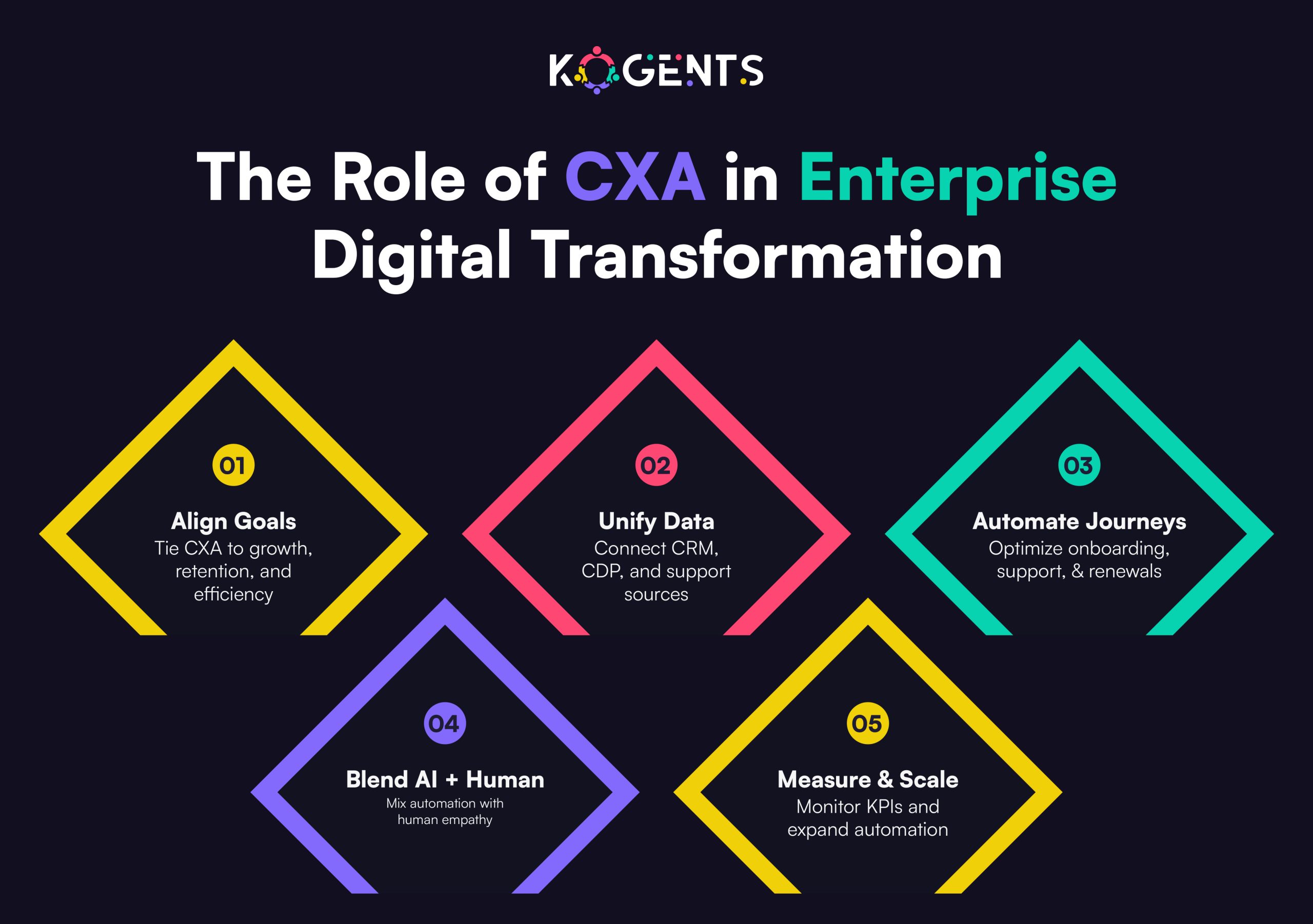
    cxa in enterprise digital transformation

    The role of AI, Machine learning, and Automation

    The core technologies behind CXA include:

    • AI-powered chatbots / virtual assistants that handle routine tasks and free human agents for complex ones.
    • Predictive analytics and machine-learning customer support AI insights that anticipate needs.
    • Journey orchestration engines that trigger next best actions across channels.
    • Robotic process automation (RPA) that automates backend workflows (billing, provisioning, etc.).
    • Generative AI and agent assist technologies that help agents respond faster, with context and knowledge-base automation. 

    Learning For You: These technologies collectively raise the bar for personalisation at scale, intelligent routing, first-contact resolution, and a 360-degree customer view.

    How Customer Experience Automation Works? 

    Core architecture & components

    Here are the key building blocks of an effective CXA platform:

    • Customer data integration: unify data from CRM, CDP, support, marketing, and sales to build that 360-degree customer view.
    • Touchpoint orchestration / omnichannel engagement: make every channel (web, mobile, social, voice, chat) part of a continuous journey.
    • Automated workflows: trigger tasks or handoffs automatically—e.g., post-purchase follow-up, cross-sell invites, renewal reminders.
    • AI decision engine/personalization engine: analyse behaviour, sentiment, interaction, history, and predict next best action.
    • Self-service portals + chatbots: allow customers to resolve issues anytime, automating common queries and deferring to humans only when needed.
    • Agent assist + intelligent routing: automation assigns tickets to the right agent, surfaces context & recommends next steps.
    • Measurement & analytics layer: real-time dashboards of CSAT, NPS, CLV, resolution time, and agent productivity.
    • Governance & continuous improvement: feedback loops, machine-learning model training, process refinement.

    Example workflow: From acquisition to retention

    1. A new lead on the website data captured in CDP → triggers a welcome chatbot message (customer-communication automation).
    2. The lead engages, gets a personalised product recommendation via AI-powered chat (personalisation engine).
    3. The user purchases → post-purchase self-service portal provides onboarding guidance (self-service automation).
    4. At the sage milestone, predictive analytics identifies the risk of churn → journey orchestration triggers proactive outreach (proactive customer engagement.
    5. Customer contacts via chat → intelligent routing assigns best-fit agent, agent assist surfaces previous interactions (first-contact resolution).
    6. After resolution, automated follow-up email solicits CSAT feedback; machine-learning sentiment analysis detects satisfaction drop → triggers deeper review (sentiment analysis + workflow).
    7. Data fed back into the CDP, the model learns and optimises next best actions.

    Integration with enterprise systems

    • For an enterprise, CXA must integrate with existing CRM (e.g., Salesforce), ERP, contact centre systems, marketing automation platforms, and back-end workflows. 
    • Automation flows often leverage RPA to handle routine tasks (billing, provisioning) while AI adds decision-making intelligence.

    Key metrics & ROI

    Here are metrics enterprises should track:

    Metric Why it matters Typical improvement
    CSAT / NPS Direct measure of experience Industry leading see +10-20 pts
    First-Contact Resolution (FCR) Reduces costs, increases satisfaction Up to +15-30%
    Agent Productivity Less time spent on routine, more on high-value ~40% improvement in some cases 
    Customer Lifetime Value (CLV) Ties CX to revenue growth +10-30% in CX-obsessed firms
    Cost to Serve Automation reduces manual labour Up to 30-50% deflection via self-service

    Key Statistics worth noting:

    Case Study Highlight

    Case Study 1: Verint (Portugal Telecom)

    Verint’s case study highlights how a telco leveraged the Verint platform’s AI-powered CXA capabilities: agent productivity increased by ~40 %. 

    Verint’s Additional claims include improved NPS, higher self-service containment, and lower cost-to-serve.

    Case Study 2: Agentic AI – “Minerva CQ”

    From an academic paper presenting a real-world depagent-assist product: By deploying Agentic AI (real-time transcription, intent/sentiment detection, dynamic, IC workflows), they achieved measurable improvements in efficiency and customer experience.

    This illustrates advanced end-to-end automation of customer experience supported by generative AI.

    Challenges & Pitfalls to Watch

    • Siloed systems: Without unified customer data, automation won’t deliver seamless experiences. 

    Example: broken omnichannel deployments persist: only 16% of organizations have fully implemented omnichannel models.

    • Poor adoption culture: Tools fail if employees don’t adopt; lack of training and change management derail automation.
    • Over-automation risk: Automation with human touch or context can degrade experience; balance is key (human + machine).
    • Data privacy & ethics: With deep customer data and AI, compliance and trust are vital.
    • ROI pressure & complexity: 66% of respondents said pressure to prove ROI is increasing. 

    CX Automation Maturity Ladder

    Stage Focus Technology / Capabilities Business Impact
    Stage 1: Reactive Manual workflows; siloed support Basic chatbots, ticket routing Cost-to-serve reduction
    Stage 2: Proactive Some automation; multiple channels Workflow automation, self-service portals Improved CSAT, FCR
    Stage 3: Orchestrated Unified data, omnichannel journeys Journey orchestration, predictive analytics, and a personalization engine Increased CLV, retention
    Stage 4: Autonomous End-to-end automation, AI-driven decisions Generative AI, agent assist, real-time decisioning, 360-degree view Scalable growth, competitive differentiation

    customer experience automation transformation

    Summing Up!

    In summary, embracing customer experience automation is no longer an optional step; it’s a strategic imperative for any enterprise seeking growth, loyalty, and operational excellence in the AI era. 

    From initial automation of routine tasks to fully orchestrated, AI-driven end-to-end customer journeys, the evolution of CXA unlocks measurable gains: higher revenue, greater CLV, l, lower costs, and stronger differentiation.

    By building the right architecture, unified data, omnichannel orchestration, AI decisioning, self-service capabilities, and coupling it with proactive change management and measurement, organisations can transform AI solutions into growth engines rather than simply cost centres.

    At Kogents.ai, we specialise in empowering enterprises to scale with the best AI agents for customer support automation and experience-automation engines designed for the modern customer. 

    Whether you’re looking to deploy end-to-end customer experience automation, enable self-service portals, optimise your journey orchestration, or embed predictive analytics into your CX stack, our team will help you map the strategy, select the platform, and drive measurable outcomes.

    FAQs

    What is customer experience automation?

    Customer experience automation (also called CX automation) refers to the use of AI-powered workflows and decision engines to streamline, pe, and orchestrate customer interactions across channels at scale.

    How does customer experience automation work?

    It works by integrating customer data into a 360-degree view, triggering automated workflows (billing, onboarding, follow-up), deploying AI decision engines (personalisation, routing, predictive analytics), and orchestrating omnichannel touchpoints (web, mobile, chat, voice).

    What are the benefits of customer experience automation?

    Benefits include improved CSAT/NPS, higher retention, increased CLV, lower cost-to-serve, higher agent productivity, faster first-contact resolution (FCR), enhanced omnichannel, and scalability for growth.

    What is the difference between customer experience automation and customer service automation?

    While customer service automation focuses on automating support tasks (like ticket routing or FAQ bots), customer experience automation (CXA) covers the broader journey, not just support but acquisition, onboarding, engagement, and retention, across all touchpoints and channels.

    What metrics matter for measuring CX automation success?

    Track CSAT/NPS, first-contact resolution, customer lifetime value (CLV), retention rate, agent productivity, cost-to-serve, self-service containment rate, resolution time, personalization success, ss rate, and omnichannel adoption.

    What challenges do enterprises face when implementing CX automation?

    Common challenges: data silos, lack of integration, cultural resistance, insufficient training, over-automation (losing human touch), regulatory/compliance issues, proving ROI, and choosing the wrong vendor/technology.

    Is CX automation suitable for both enterprise and SMB?

    Yes, but scale and complexity differ. Enterprises require more integration, global scaling, complex workflow, and omnichannel orchestration; SMBs may start with self-service bots and gradually evolve. Choose a platform that can scale.

    What trends in 2025 and beyond should I be aware of in CX automation?

    Trends: generative AI in customer service, autonomous customer engagement (human + machine), deeper personalization at scale, intelligent routing with sentiment and intent, seamless omnichannel experiences, self-service portals as standard, proactive engagement, and using analytics to drive growth.

  • AI Integration for Legacy Systems Without Disrupting Critical Enterprise Workflows

    AI Integration for Legacy Systems Without Disrupting Critical Enterprise Workflows

    In the modern enterprise, agility isn’t just an advantage but survival. Yet, many global organizations still depend on legacy systems built decades ago.

    From COBOL-based banking software to monolithic healthcare databases, these systems handle mission-critical operations, but they also constrain innovation, scalability, and speed.

    The challenge: how can you bring artificial intelligence (AI) into such fragile ecosystems without breaking workflows that millions rely on daily?

    The solution isn’t a “rip and replace.” It’s AI integration for legacy systems, a layered modernization approach that preserves stability while infusing intelligence, automation, and predictive analytics.

    Done right, this strategy transforms rigid infrastructures into adaptive, insight-driven platforms, without a single day of downtime.

    This guide explores how to execute that transformation. So, let’s uncover how to evolve your enterprise systems from legacy-bound to AI-powered, securely, incrementally, and intelligently.

    Key Takeaways

    • AI integration modernizes without disruption.
    • Prioritize architecture, not just AI models.
    • Pilot, measure, iterate, and govern continuously.
    • Treat modernization as an enterprise-wide evolution.
    • With structured planning, legacy doesn’t limit innovation; it fuels it.

    Strategic Insights At A Glance

    1. Legacy ≠ Liability. Treat legacy systems as strategic assets with rich data and proven logic; AI should augment, not erase them.
    2. Continuity is King. Modernize incrementally using hybrid overlays and sandbox pilots that preserve uptime.
    3. Architecture Over Algorithms. Focus first on data readiness, APIs, and interoperability before deploying models.
    4. Governance Before Genius. Compliance, data lineage, and explainability must precede scaling.
    5. Hybridization Wins. Combine legacy cores with cloud-based AI microservices and automation overlays to achieve agility without chaos.

    ai integration for legacy system

    Why AI Integration for Legacy Systems is a Business Imperative?

    In 2019, a U.S. Government Accountability Office (GAO) report found that the federal government spends more than $100 billion on IT and cyber-related investments annually. Of this amount, agencies have typically spent about 80% on the operations and maintenance of existing IT investments, including legacy systems.

    AI integration offers a smarter path: enhancing existing systems rather than dismantling them and replacing them outright is often risky and cost-prohibitive.

    Many enterprises also ask, “How much does it cost to build an AI system?, but the truth is that integration often delivers higher ROI at lower cost compared to a full rebuild.

    Benefits include:

    • Unlocking siloed data for real-time analytics.
    • Embedding intelligence through predictive models and process automation.
    • Reducing technical debt via AI-driven refactoring and dependency mapping.
    • Maintaining compliance and audit trails during transformation.

    Note: With AI integration with legacy systems, organizations can modernize without stopping the business clock.

    Architectural Frameworks & Real-World Modernization Models

    AI-driven modernization isn’t one-size-fits-all. Here are the five leading architectural frameworks enterprises use to modernize intelligently:

    1. Overlay Integration (Minimal Disruption Model)

    • Concept: Layer AI microservices over legacy systems via APIs.
    • Example: A global bank adds AI-powered fraud detection through an API connected to its legacy transaction system.  
    • Suggestion: For teams exploring how to create an AI agent from scratch, this framework offers a foundation, showing how modular AI agents can interact with legacy APIs safely and effectively.
    • Benefit: Non-intrusive, quick to deploy, zero downtime.

    2. Modular Refactoring (Evolutionary Model)

    • Concept: Break legacy monoliths into microservices, modernizing each component with AI.
    • Example: A logistics firm adds an AI forecasting agent to its refactored order module.
    • Benefit: Gradual modernization without full rebuilds.

    3. Hybrid Cloud Integration (Elastic Model)

    • Concept: Shift select workloads to the cloud while legacy data remains on-prem.
    • Example: Healthcare providers run AI diagnostic models in the cloud using anonymized EHR data from on-prem systems.
    • Benefit: Flexible scaling, lower infra cost, minimal risk.

    4. Automated Code Modernization (AI-First Model)

    • Concept: Use AI tools to analyze and refactor code automatically (COBOL → Java). 
    Example: Abt teams have the experience to know why the first output from a GenAI tool is often the best, especially when using deterministic settings, because GenAI is initially anchored on the most probable output. On follow-up, these tools may become less accurate as they navigate the embedding space, leading to less probable outputs.
    • Benefit: Faster modernization with less human intervention.

    5. Digital Twin Environments (Risk-Free Sandbox)

    • Concept: Create a digital replica of your system to test AI integrations safely.
    • Benefit: Zero-risk experimentation and rapid iteration.
    Framework Disruption Level Integration Speed Ideal Use Case
    Overlay Minimal Fast Continuous workflows
    Modular Refactoring Medium Gradual Modular systems
    Hybrid Cloud Low Moderate AI analytics
    Automated Refactoring Medium Fast Code conversion
    Digital Twin None Iterative Safe AI testing

    Step-by-Step: Achieving AI Integration Without Disruption

    Modernization through AI should feel like evolution, not surgery. Here’s a detailed six-step blueprint for intelligent, disruption-free transformation.

    Assess Your Legacy Footprint

    • Every modernization journey begins with visibility. 
    • Most legacy systems contain undocumented dependencies and brittle code that can collapse under pressure if not mapped.

    Actions to take:

    • Catalog all systems, databases, and batch jobs.
    • Map mission-critical workflows (billing, HR, compliance).
    • Identify outdated frameworks, unsupported code, and security gaps.
    • Use AI-based discovery tools (CAST Highlight, IBM Watson AIOps) for automated dependency analysis.

    Outcome: A full “digital MRI” of your ecosystem, pinpointing what’s stable, what’s risky, and what’s integration-ready.

    Build an AI-Ready Data Architecture

    Data is the lifeblood of AI, but legacy systems often store it in silos or outdated formats.

    Actions to take:

    • Clean, classify, and standardize all data sources.
    • Deploy data pipelines using Snowflake, Databricks, or Apache NiFi.
    • Establish metadata management and lineage tracking.
    • Introduce real-time data streaming (Kafka, Pulsar) for live analytics.
    • Secure and anonymize sensitive data per GDPR/HIPAA.

    Outcome: Unified, AI-ready data pipelines that enable automation and decision-making without manual effort.

    Deploy Middleware/API Layer for Interoperability

    • Think of this as a “translator” between your old and new systems. 
    • Middleware enables the AI and legacy application integration you need for smooth communication.

    Actions to take:

    • Implement integration platforms like MuleSoft, IBM App Connect, or WSO2.
    • Wrap legacy functions as RESTful APIs for modular access.
    • Standardize data formats and implement rate limits.
    • Use monitoring tools to track latency and prevent overload.

    Example: A manufacturer uses APIs to connect a legacy ERP with an AI engine for predictive supply-chain analytics, without changing the core ERP logic.

    Pilot with a High-ROI Workflow

    • Start where risk is low and value is high. 
    • This validates the approach while maintaining operational safety.

    Actions to take:

    • Choose a contained process—e.g., invoice automation, demand forecasting, or customer query handling.
    • Define measurable KPIs: speed, cost reduction, and accuracy.
    • Run parallel operations (AI + legacy) for comparison.
    • Measure gains and gather stakeholder feedback.

    Outcome: A tangible proof-of-concept showing AI’s impact, paving the way for enterprise-wide adoption.

    Measure KPIs & Iterate Continuously

    • AI integration is iterative. 
    • Constant performance measurement ensures you’re improving, not just changing.

    Actions to take:

    • Define dual KPIs: technical (latency, uptime) and business (ROI, error reduction).
    • Track metrics with observability tools like Grafana, Datadog, or Prometheus.
    • Feed back real-world data into models for retraining.
    • Create executive dashboards to visualize progress.

    Outcome: Continuous optimization cycle, every iteration makes systems smarter, faster, and more reliable.

    Scale with Governance and Compliance

    • As AI expands across your enterprise, governance becomes your anchor. 
    • Poor oversight risks data breaches, bias, and compliance violations.

    Actions to take:

    • Implement model governance (versioning, retraining, explainability).
    • Conduct bias audits using SHAP, LIME, or Google’s Model Card Toolkit.
    • Align frameworks with ISO/IEC 27001, SOC 2, and GDPR.
    • Form an AI Modernization Council combining IT, Legal, and Compliance leaders.
    • Maintain rollback plans to disable AI modules safely if needed.

    Outcome: A stable, compliant, scalable ecosystem where AI coexists safely with mission-critical operations.

    Pro Insight: Document every policy in a living AI Operations Manual, your enterprise’s playbook for consistent, ethical modernization.

    ai integration for legacy systems in regulated industries

    Field-Tested Implementation Tactics & Expert Moves

    • Build a digital twin sandbox to safely test AI overlays.
    • Introduce API bridges for communication between systems.
    • Automate code analysis using AI-driven tools for faster documentation.
    • Embed AI incrementally, starting with augmentation, not replacement.
    • Monitor compliance and explainability to maintain trust.
    • Upskill teams through fusion squads blending legacy and AI expertise.
    • Track performance continuously using precision KPIs.

    “When systems evolve faster than leaders, disruption is inevitable.” — John Chambers (former CEO, Cisco)

    Case Study Spotlight

    1. Federal Legacy Code Conversion (Abt Global)

    A federal agency used AI to refactor COBOL code into Java, preserving workflows while enhancing maintainability. 

    Result: 50% faster modernization, 93% code accuracy, zero downtime.

    2. Wearable Tech Migration (WNS)

    AI and automation migrated data from legacy ERP to the cloud.

    Result: 40% faster migration, 30% fewer data errors.

    3. Financial Services Testing (McKinsey)

    A global insurer used AI agents to automate regression testing on legacy apps.

    Result: 50% faster test cycles and reduced manual QA.

    4. Healthcare Digital Twin Integration (SymphonyAI)

    Hospitals deployed digital twins for AI diagnostics, keeping patient systems stable.

    Result: +23% diagnostic accuracy with zero disruption.

    AI Agents vs Traditional Modernization Tools

    Feature Traditional Tools AI-Driven Modernization
    Speed Slow, manual 5x faster (automated)
    Downtime High risk Minimal (overlay model)
    Cost High CapEx ~40% reduction (McKinsey, 2024)
    Accuracy Human-dependent 93% AI code accuracy (arXiv, 2024)
    Scalability Limited Elastic & modular

    Conclusion

    Legacy systems have powered industries for decades, but they weren’t built for the intelligent era.

    Now, with AI integration for legacy systems, enterprises can fuse stability with innovation, unlocking agility, insight, and growth without breaking critical workflows.

    From architecture audits to governance frameworks, this guide provides your roadmap to modernization that’s intelligent, compliant, and sustainable.

    Brand Edge: Kogents.ai

    At Kogents ai, we help organizations modernize safely. Our AI overlay solutions empower enterprises to extend legacy lifecycles, automate operations, and unlock data intelligence, without downtime or risk.

    Whether you manage a 20-year-old system or a hybrid infrastructure, we commit to being the best agentic AI company that coexists with legacy, securely and seamlessly.

    FAQs 

    What is AI integration for legacy systems?

    It’s embedding AI into existing infrastructure to add intelligence, automation, and analytics, without full replacement.

    How can I modernize without downtime?

    Use overlay architectures, API gateways, and sandbox pilots that run parallel to production.

    What are the key challenges?

    Technical debt, fragmented data, compliance risks, and a lack of documentation.

    Which industries benefit most?

    Healthcare, finance, logistics, and government, where uptime and compliance are mission-critical.

    What is a digital twin?

    A replica of your system used to test AI safely before production rollout.

    How does data quality affect AI?

    Poor data leads to inaccurate predictions. Clean, structured data ensures reliable AI output.

    What’s the typical ROI?

    Studies show up to 2.7x ROI and 40% cost reduction within 18 months of AI-enabled modernization.

    Can AI automatically refactor code?

    Yes, AI can translate and optimize legacy code with 90%+ accuracy, reducing modernization time dramatically.

    How do small businesses start?

    Use no-code AI overlays or SaaS tools for incremental automation, no deep IT investment required.

    What’s the first step today?

    Audit your systems, pick one workflow to pilot, measure ROI, and scale strategically.

  • AI Governance and Compliance Frameworks Every CTO Needs Before Deployment

    AI Governance and Compliance Frameworks Every CTO Needs Before Deployment

    It’s the 21st century, and shipping AI without a governance plan is like deploying microservices without observability.

    AI governance and compliance ensure your models align with law, ethics, and business risk appetite.

    Governance defines the principles, roles, and controls; compliance ensures continuous adherence to standards and regulations such as the EU AI Act, GDPR/CCPA, ISO/IEC 42001, and the NIST AI Risk Management Framework (AI RMF). 

    Across sectors, from fintech to healthcare, companies that adopt trustworthy AI early reduce audit friction, unlock procurement, and shorten enterprise sales cycles. 

    And regulators are moving: the EU AI Act introduces a risk-tiered regime with strict requirements for “high-risk” systems. 

    Moreover, NIST AI RMF provides a practical backbone (Govern, Map, Measure, Manage) used by industry; ISO/IEC 42001 formalizes an AI management system you can certify.

    This article gives CTOs a clear deployment-ready playbook: frameworks to adopt, controls to implement, metrics to track, loopholes to avoid, and case studies where governance made or broke outcomes.

    Key Takeaways 

    • Governance is a growth lever as it unlocks enterprise sales, reduces audit drag, and mitigates crisis risk.
    • Standards and laws converge by using NIST AI RMF for risk ops, ISO/IEC 42001 for management systems, and align with the EU AI Act.
    • Continuous, not one-and-done, means bias, privacy, and explainability controls must operate before and after launch, with logs and recourse.
    • Learn from failures, knowing Dutch benefits, A-levels, Amazon recruiting, and Apple Card, each exposes specific governance gaps to close. 

    The Business Impact of AI Governance and Compliance

    The global AI Governance Market size is expected to reach USD 5,776.0 million by 2029 from USD 890.6 million in 2024, to grow at a CAGR of 45.3%. 

    Revenue Enablement: 

    • Enterprise buyers increasingly require AI risk & compliance attestations (policy, testing, audit logs). 
    • Aligning with NIST AI RMF and ISO/IEC 42001 accelerates vendor assessments and certifications.

    Regulatory Readiness

    • The EU AI Act mandates transparency, data quality, risk management, and human oversight for high-risk AI. 
    • Your governance posture becomes a license to operate, a standard that even the best agentic AI company must uphold when navigating high-risk or regulated AI systems.

    Brand Trust & PR Resilience

    Recent investigations and enforcement actions (e.g., FTC “Operation AI Comply”; Italy’s fine regarding ChatGPT) show how poor oversight can trigger fines and reputational damage. 

    Bottom line: Governance reduces the cost of change, and crises create a repeatable compliance muscle, and turn “Are we compliant?” into “We can prove it.”

    ai governance and compliance frameworks

    Real-World Impact: When Governance Works, and When It Doesn’t? 

    • NYC AEDT (Local Law 144): Requiring bias audits, notices, and published summaries for automated hiring tools created market pressure for bias testing and documentation, a governance win pushing vendors to up their game.
    • Dutch Childcare Benefits Scandal: An algorithm flagged thousands of families for fraud, disproportionately harming those with foreign backgrounds; authorities later found the practices unlawful and discriminatory, with severe GDPR violations. Governance gaps, including data policy, oversight, and redress.
    • UK A-Level Grading (2020): The grading algorithm lacked transparency and uncertainty bounds; public backlash forced withdrawal. Governance gaps identified were explainability, stakeholder communication, and impact assessment.
    • Amazon Recruiting Tool (2018): Internal model learned to downgrade women’s resumes, illustrating the cost of biased historical data and insufficient bias controls. Governance gaps were majorly in data curation, fairness testing, and change control.
    • Apple Card (2019): Allegations of gender bias triggered a state investigation, reminding fintechs that explainability and adverse-action transparency are table stakes. Governance gaps were in interpretability and fair-lending explainability.
    • Enforcement & Claims: The FTC has targeted deceptive AI marketing and fake-review tooling; Italy’s Garante fined an AI provider for transparency and legal-basis shortcomings. Governance gaps were truthful claims, privacy/legal basis, and age gating.

    Loopholes & Failure Modes You Need to Close 

    • Shadow AI & Untracked Models
    • Loophole: Teams spin up models without registration or review.
    • Fix: Central Model Registry with mandatory risk tiering, owners, data lineage, and pre-launch checklists mapped to NIST AI RMF.
    • Explainability Theater
    • Loophole: Post-hoc plots with no policy link.
        • Fix: Tie XAI methods to concrete adverse-action and user-recourse workflows (esp. lending, employment).
    • Bias Testing Once, Not Continuously
        • Loophole: One-time fairness test at launch.
        • Fix: Continuous bias monitoring with drift detection; publish NYC-style bias audit summaries for high-stakes settings.
    • Compliance by Vendor Slide Deck
        • Loophole: Relying on provider assurances.
        • Fix: Contractual DPAs, DPIAs/AIAs, data-residency, and audit rights; align with ISO/IEC 42001 supplier oversight requirements.
    • No Redress
        • Loophole: Users can’t contest or appeal decisions.
        • Fix: Human-in-the-loop escalation, clear appeals, and Article-22-style safeguards (automated decisions) when applicable.
    • Unverified Marketing Claims
      • Loophole: “AI replaces lawyers/doctors” claims.
      • Fix: Substantiation and internal legal review; FTC has signaled scrutiny of deceptive AI claims. 

    The CTO’s Governance Operating Model (GOM)

    • Policy: Define AI principles (fairness, safety, transparency, privacy by design), decision rights, and acceptable-use rules tied to NIST AI RMF and ISO/IEC 42001.
    • Structure: Name Accountable Owners (product + data science), an Ethical Review Board, and an independent audit function.
    • Process: Pre-deployment risk/impact assessments (AIA), data protection impact assessments (DPIA), threat modeling (including prompt-injection/ data exfil risk).
    • Controls: Bias testing, XAI, logging/audit trails, privacy controls, security hardening, and content safety/red teaming.
    • Assurance: Internal audits, external certifications; align high-risk use cases with EU AI Act obligations.

    how leaders can drive governance from the top down

    AI Agents vs. Other Tools

    Dimension AI Agents (Governed) Traditional Automation Generic AI APIs
    Risk Tiering & Registry First-class citizen (model cards, owners, AIA/DPIA) Ad-hoc Varies by vendor
    Explainability (XAI) Local & global methods linked to user recourse Minimal Often opaque
    Bias / Fairness Pre-launch & continuous audits; publish summaries in regulated contexts Rare Vendor-dependent
    Privacy & Data Gov. Privacy-by-design, consent, data lineage Limited Varies; data residency may be unclear
    Compliance Mapping Explicit alignment: EU AI Act, NIST AI RMF, ISO/IEC 42001 None Partial
    Human Oversight Role-based approvals, override, appeals Manual Limited
    Auditability Tamper-evident logs, model/version control Basic logs Vendor black box
    Post-Market Monitoring KPIs, drift, incident playbooks Minimal Provider-defined


    Why it matters: For high-stakes uses (hiring, lending, health), the NYC AEDT rule and the EU AI Act set a direction: bias audits, transparency, oversight, and ongoing monitoring. Build for that target now.

    Technical Controls That Satisfy Auditors and Operators

    • Data Governance: Source vetting, data lineage/provenance, minimization, PII controls, consent.
    • Bias & Fairness: Group fairness metrics (TPR/FPR parity, adverse impact), counterfactual tests, and synthetic gap analysis.
    • Explainability: SHAP/LIME and policy-linked explanations (adverse-action notices, patient explanations).
    • Safety & Robustness: Red teaming, adversarial tests, jailbreak prevention, rate-limiting, and content filters.
    • Security: Secrets isolation, retrieval governance, audit trail/logging, confidential computing where feasible.
    • Monitoring: Concept drift, performance decay, bias drift, automatic rollback, and incident runbooks.
    • Documentation: Model cards, system cards, training/validation datasets, evaluation harnesses, mapped to NIST AI RMF and ISO/IEC 42001 clauses for audit. 

    Cases: Healthcare/Mental Health, Fintech, and SMB Automation

    Healthcare/Mental Health Assistive Triage

    • Risk: Misclassification, privacy breaches.
    • Controls: Clinical validation; human-in-the-loop; consent and minimal-necessary data; explainable outputs to clinicians.
    • Why: Aligns with AI RMF (risk management) and data-protection expectations under GDPR. 

    Fintech Credit Decisions

    • Risk: Fair-lending bias, opaque denials, state investigations (Apple Card scrutiny).
    • Controls: Fairness metrics, feature constraints, explainability suitable for adverse actions, and governance for model changes. 

    SMB/Startup Hiring Agents

    • Risk: Disparate impact in screening; legal exposure under NYC AEDT rule.
    • Controls: Independent bias audits; candidate notices; publish audit summaries; opt-out and appeal channels.

    What Still Breaks: Structural Gaps the Industry Must Address

    • Multi-Vendor Chains: When chat orchestration calls multiple providers, liability and auditability blur. 

    Solution: end-to-end logs with request/response signatures and vendor addenda.

    • Synthetic Data Overconfidence: Synthetic augmentation can hide bias or shift distributions; mandate real-data spot checks and robust drift monitoring.
    • Metrics Without Thresholds:  Teams report AUC/precision but lack policy thresholds (e.g., “halt if adverse-impact ratio < 0.8”) and turn metrics into guardrails.
    • Incident Underreporting: Many teams lack post-market monitoring and user redress. Borrow from safety-critical incident reporting and codify SLAs for fixes.
    • Marketing ≠ Proof: Compliant” isn’t a claim, it’s an evidence chain (tests, logs, approvals). FTC actions show the cost of puffery. 

    Case Study Spotlight 

    Startup Helpdesk Agent (B2B SaaS):

    • A seed-stage startup rolled out an LLM helpdesk agent. 
    • Enterprise pilots stalled until they added a governance bundle: DPIA, model cards, bias tests on escalation routing, and drift monitoring. 
    • Sales cycles shortened, and two pilots converted to annual contracts, explicitly citing the governance posture as a factor.

    Mental Health Intake (Clinic Network): 

    • The clinic adopted a triage assistant. 
    • They required clinician override, explainability to providers, and consent workflows. 
    • The project passed privacy review and increased provider satisfaction due to a transparent rationale.

    What to Measure: KPIs for Governed AI?

    • Compliance Coverage: % of models with completed AIA/DPIA & model cards.
    • Bias Metrics in Compliance Range: Adverse-impact ratio, equalized odds deltas within thresholds.
    • Explainability SLA: % of decisions with user-readable reasons delivered under X seconds.
    • Drift & Incident MTTR: Time to detect and resolve drift or bias spikes.
    • Audit Readiness: Time to compile evidence pack for customer/regulator; ISO/IEC 42001 audit pass.

    Summing Up! 

    The companies winning with AI aren’t the ones moving recklessly; they’re the ones moving responsibly and measurably. 

    Strong AI governance and compliance transform risk into advantage: faster enterprise approvals, smoother audits, and durable trust with customers and regulators. 

    If you’re a CTO, entrepreneur, or solopreneur, the path is clear: register your models, test for bias, explain decisions, monitor continuously, and document everything. 

    That’s the difference between AI that merely works and AI that your buyers, clinicians, and regulators can trust. See how Kogents.ai can do it for you. 

    So, contact us at the given number at +1 (267) 248-9454 or drop an email at info@kogents.ai

    FAQs 

    What is “AI governance and compliance” in practice?

    Governance sets the policies, roles, and controls for responsible AI; compliance proves you meet laws and standards (e.g., EU AI Act, GDPR, NIST/ISO).

    How has governance actually changed outcomes?

    Bias-audit rules in hiring (NYC AEDT) and enforcement actions (FTC, Italy’s Garante) shifted teams from “launch first” to “audit first.”

    What are the biggest loopholes teams miss?

    Shadow AI, one-time bias tests, vendor black boxes, and lack of user recourse; fix with registries, continuous monitoring, and appeal mechanisms.

    Do small teams really need this?

    Yes. Minimal governance (registry, bias checks, explainability) reduces sales friction and future rework; scalable tools make it affordable.

    What frameworks should we start with?

    Adopt NIST AI RMF for risk management; target ISO/IEC 42001 for certifiable management systems; map obligations to EU AI Act.

    How do we handle hiring or credit decisions?

    Run independent bias audits, publish summaries as required (e.g., NYC AEDT), offer notices and appeals, and maintain explainability artifacts.

    What’s the cost of getting it wrong?

    Investigations, fines, and reputational damage (see Apple Card scrutiny, Dutch scandal, enforcement actions).

    Which controls matter most at launch?

    Bias testing, privacy impact assessments, explainability tied to user recourse, secure logging, and a rollback plan.

    What tools help?

    Platforms that combine governance workflows, audits, explainability, and monitoring, like Kogents.ai, plus external certs (e.g., ISO/IEC 42001 readiness). 

  • Scalable AI Solutions That Accelerate Enterprise-Wide Deployment Success

    Scalable AI Solutions That Accelerate Enterprise-Wide Deployment Success

    Every entrepreneur or solopreneur dreams of taking advantage of artificial intelligence to automate processes, uncover insights, and outperform competition

    Yet, most AI projects never make it beyond the lab. 

    According to McKinsey’s Seizing the Agentic AI Advantage, they state: “more than 80 percent of companies still report no material contribution to earnings from their gen AI initiatives.”

    This is where scalable AI solutions come into play, designed to transform isolated models into production-grade, enterprise-scale AI systems that adapt dynamically, handle massive workloads, and drive continuous ROI.

    Whether you’re an early-stage founder building on limited compute resources or a healthcare enterprise managing petabytes of patient data, scalable artificial intelligence systems offer the architectural backbone to deliver results at scale, in real time, and on budget.

    In this blog, we’ll unpack what enterprises can learn from startups that successfully deployed scalable machine learning solutions and how the next generation of distributed AI systems is shaping the landscape of enterprise-wide deployment success.

    So, give it a thorough read now. 

    Key Takeaways 

    • Scalable AI solutions are the foundation for sustainable digital transformation.
    • They enable real-time inference, automated scaling, and reliable governance across departments.
    • Case studies show measurable ROI, faster deployments, higher accuracy, and cost savings.
    • The future of scalable AI architecture will blend edge computing, MLOps, and autonomous orchestration.
    • Entrepreneurs who adopt scalable AI platforms early will future-proof their business for exponential growth.

    The Need for Scalability: Beyond One-Off AI Wins

    It is not just about running bigger models but creating sustainable, adaptable, and fault-tolerant systems that evolve as data grows.

    Imagine deploying a chatbot that handles 1,000 queries a day, then suddenly needs to serve 100,000 as your startup goes viral. 

    Without a scalable AI infrastructure, your once-efficient model crashes under pressure.

    Scalable AI solutions solve this through:

    • Elastic resource allocation: Using cloud-native autoscaling (AWS, Azure, or GCP) to match computational demand dynamically.
    • Horizontal and vertical scaling: Expanding compute nodes or upgrading GPU/TPU cores to maintain real-time inference speeds.
    • Fault tolerance: Ensuring no downtime during retraining, deployment, or updates.
    Outcome: A scalable AI deployment pipeline that grows effortlessly with your business, ensuring consistent performance from startup MVPs to enterprise workloads.

    The Architecture of Scalable AI Systems 

    To scale AI successfully, you need the right architecture, an intelligent ecosystem that balances speed, flexibility, and reliability.

    Core Components of a Scalable AI Architecture

    Data Engineering Layer

    • Ingestion: Streaming or batch data collected through APIs or sensors.
    • Processing: ETL pipelines ensure clean, structured data.
    • Storage: Distributed databases and object storage (e.g., Snowflake, BigQuery, S3).

    Model Development Layer

    • Modular model design using frameworks like TensorFlow, PyTorch, or ONNX.
    • Reusable model architectures for transfer learning and rapid experimentation.
    • Experiment tracking via MLflow or Weights & Biases.

    Training & Orchestration

    • Distributed training on clusters (using Ray, Horovod).
    • Autoscaling compute nodes for optimal resource utilization.
    • Integration with AIOps / MLOps pipelines for version control and CI/CD automation.

    Model Serving & Inference

    • Microservices-based serving (TensorFlow Serving, TorchServe).
    • Load balancing and real-time scalable AI inference with GPUs/TPUs.
    • Low latency is achieved via caching, batching, and sharding.

    Monitoring & Governance

    • Model performance tracking (drift detection, bias monitoring).
    • Data lineage and governance tools (e.g., Great Expectations, Monte Carlo).
    • Security protocols (ISO/IEC 27001, NIST AI framework).

    Insight: A scalable AI pipeline built on this architecture ensures that from training to serving, every step is automated, monitored, and resilient.

    Common Challenges and Limitations in Scaling AI 

    Building an AI model is easy, but scaling it efficiently? That’s where most organizations stumble.
    Here are the key limitations that hinder enterprise AI development and deployment. 

    • Data fragmentation: Siloed or inconsistent data pipelines disrupt training and inference flow.
    • Infrastructure overhead: GPUs and high-performance hardware inflate costs without smart orchestration.
    • Model drift: AI systems degrade over time as real-world data diverges from training sets.
    • Latency and throughput bottlenecks: Without scalable inference systems, predictions lag during high traffic.
    • Governance and compliance: Scaling AI across departments introduces new privacy, ethics, and data governance challenges.
    For solopreneurs, that might mean integrating lightweight, scalable AI frameworks like FastAPI + PyTorch Lightning; for enterprises, it involves multi-cloud orchestration using Kubernetes or Kubeflow pipelines.

    ai projects fail to scale

    AI Agents vs. Other Tools

    Feature AI Agents (Scalable AI Solutions) Traditional Automation Tools Manual Operations
    Learning Capability Continuously improves via ML/DL Static, predefined rules Human-dependent
    Scalability Built on a scalable AI architecture with autoscaling Limited by server capacity None
    Deployment Speed Instant via containerized deployment Requires manual setup N/A
    Adaptability Context-aware and data-driven Fixed logic Human flexibility only
    Cost Efficiency Pay-per-use on cloud, optimized compute License or hardware-heavy Labor cost-intensive
    Accuracy Over Time Increases via retraining and feedback loops Declines without updates Inconsistent
    Use Case Fit Perfect for enterprise-scale AI apps Simple automations Creative or ad-hoc tasks

    Case Study Spotlight: Scaling AI in Action 

    Case Study 1: E-commerce Optimization at Scale

    A mid-sized retailer struggled to forecast demand across 10,000 SKUs, by deploying a scalable machine learning solution on Google Cloud Vertex AI, the company automated inventory management.

    • Result: Forecast accuracy improved by 37%, while cloud costs dropped by 28% due to autoscaling and real-time inference.

    Case Study 2: Healthcare Triage with Scalable AI Systems

    A telemedicine startup built an AI at scale triage system using federated learning to preserve data privacy across hospitals.

    • Result: Patient routing efficiency increased by 60%, while maintaining HIPAA compliance.

    Case Study 3: Solopreneur AI Content Platform

    A single-founder business integrated scalable AI deployment pipelines on AWS Lambda for content personalization.

    • Result: Reduced content generation time from hours to minutes, saving 20 hours weekly.

    Note: These examples demonstrate that scalable AI infrastructure is not just for big tech; it’s the democratizing layer that allows anyone to deploy intelligence at enterprise-grade scale.

    Enablers of Successful Enterprise-Wide AI Deployment 

    Scaling AI is not just about technology but about strategy, governance, and the alignment of people, processes, and infrastructure. This approach is exemplified by the best agentic AI company in the enterprise industry.

    Organizations that succeed with scalable AI solutions share a few core enablers that distinguish them from those perpetually stuck in pilot mode.

    1. Unified Data Foundation

    The backbone of any scalable AI architecture is a unified, governed, and high-quality data ecosystem.

    • Data integration and governance: Enterprises must establish robust data pipelines and metadata tracking for every source, ensuring consistency, compliance, and lineage.
    • Example: IBM’s “AI Readiness Framework” emphasizes that data accessibility and standardization are the first checkpoints in scaling AI effectively.

    2. Modular and Elastic Infrastructure

    Modern AI scalability depends on infrastructure that grows and shrinks on demand.

    • Cloud-native, containerized environments like Kubernetes and Docker ensure models are portable across clusters and clouds.
    • Elastic AI systems leverage horizontal and vertical scaling in AI, allocating GPUs/TPUs dynamically to balance cost and performance.

    Case Insight: A report from McKinsey claims that organizations must move from AI experimentation to industrialized scalability, designing systems that anticipate integration, monitoring, and cost control. Unlike traditional IT, gen AI’s recurring costs can exceed initial build costs, making economic sustainability essential.

    3. Cross-Functional AI Operating Model

    Technology alone doesn’t scale; teams do.

    • A centralized AI Center of Excellence (CoE) with data scientists, domain experts, and ML engineers accelerates reuse and governance.
    • MLOps and AIOps practices streamline model delivery, automating retraining, drift detection, and rollout across departments.
    1. Continuous Monitoring and Optimization

    Scalable AI deployment doesn’t end at launch.

    • Enterprises must track model performance, drift, and bias in production to ensure fair, accurate predictions.
    • Real-time scalable AI pipelines with built-in observability tools (like Prometheus or Grafana) help sustain reliability under unpredictable workloads.

    5. Compliance, Security, and Trust

    As models scale, so does their ethical and regulatory footprint.

    • Ensure adherence to frameworks such as ISO/IEC 27001, NIST AI RMF, and emerging EU AI Act standards.
    • Apply explainability tools (e.g., SHAP, LIME) to maintain transparency and stakeholder confidence.
    The GenAI Divide is starkest in deployment rates; only 5% of custom enterprise AI tools reach production.

    scalable ai solution

    Conclusion

    The age of scalable AI solutions is here, and it’s redefining what’s possible for businesses of every size. 

    Whether you’re an emerging entrepreneur, a healthcare innovator, or an enterprise CTO, the ability to deploy and scale AI seamlessly determines how quickly you can innovate, compete, and grow.

    Scalable artificial intelligence systems ensure that your ideas don’t stay in the lab; they evolve into production-ready models that learn, adapt, and thrive in dynamic business environments.

    At its heart, scalability isn’t just a technical choice; it’s a growth philosophy. It’s about building AI that grows with you, intelligently, efficiently, and ethically.

    But, are you ready to accelerate your AI journey?

    Then have a look at how Kogents deploys scalable AI effortlessly.

    FAQs

    What are scalable AI solutions?

    Scalable AI solutions are systems engineered to maintain performance as workloads and data volumes grow. They use cloud computing, distributed architectures, and MLOps to deliver high-performance AI systems capable of serving thousands, or millions, of users simultaneously.

    How do scalable AI architectures differ from traditional AI setups?

    Traditional setups are static and local; scalable AI architectures are dynamic, distributed, and cloud-native. They can expand horizontally (adding more nodes) or vertically (adding power to existing nodes) to handle demand.

    Why do many enterprises struggle to scale AI?

    Lack of data strategy, fragmented infrastructure, and poor model monitoring hinder scalability. Enterprises often deploy models without considering autoscaling, load balancing, or latency optimization.

    Which industries benefit most from scalable machine learning systems?

    Healthcare, e-commerce, logistics, fintech, and education benefit significantly due to fluctuating workloads and real-time decision-making needs.

    Can solopreneurs use scalable AI platforms without coding?

    Absolutely. Platforms like Kogents.ai offer low-code environments enabling individuals to train, deploy, and scale AI models without deep technical skills.

    How do elastic AI systems reduce operational costs?

    Elastic systems scale resources automatically, reducing idle compute costs by only using what’s needed. For example, autoscaling GPU clusters can cut expenses by up to 40%.

    What’s the role of MLOps in enterprise-scale AI?

    MLOps integrates DevOps principles for machine learning, automating deployment, testing, and rollback. It ensures the continuous delivery of scalable AI models across production environments.

    Is edge AI part of scalable AI infrastructure?

    Yes. Edge AI brings inference closer to the data source, reducing latency. Combined with cloud AI, it creates hybrid scalable AI systems ideal for IoT, manufacturing, and real-time monitoring.

    What’s the difference between horizontal and vertical scaling in AI?

    • Horizontal scaling: Adding more machines (nodes). 
    • Vertical scaling: Adding more power (CPU/GPU) to existing machines.
      Both are crucial for achieving enterprise-scale AI performance.

    How can I start building a scalable AI pipeline today?

    Begin with a cloud-native infrastructure (AWS, GCP, or Azure), containerize your models, and adopt CI/CD pipelines. Use tools like Airflow, Kubeflow, or MLflow for orchestration and monitoring.

  • Deploying a healthcare chatbot with PHI-safe data handling and clinician escalation

    Deploying a healthcare chatbot with PHI-safe data handling and clinician escalation

    Well, we all know that in the past decade, healthcare has shifted from reactive treatment to proactive, data-driven engagement. 

    Patients now expect real-time access to health information and immediate support, something traditional systems often can’t deliver.

    Having said that, the emergence of healthcare chatbots, a conversational AI capable of providing 24/7 AI patient scheduling, support, symptom triage, medication reminders, and administrative assistance.

    Powered by natural language processing (NLP) and machine learning (ML), these systems are helping clinics and startups scale patient engagement at a fraction of the cost.

    Whether it’s a virtual health assistant in telemedicine or a symptom checker chatbot for primary care, conversational AI is no longer an experiment; it’s a clinical necessity.

    Key Takeaways

    • PHI protection and encryption are the cornerstones of patient trust.
    • Clinician escalation safeguards care quality and prevents harm.
    • Ethical and explainable AI builds credibility and regulatory confidence.
    • Integration with EHR and FHIR standards unlocks scalability.
    • The best healthcare chatbots enhance clinicians — they never replace them.

    What Is A Healthcare Chatbot?

    A healthcare chatbot (also known as a medical chatbot or AI chatbot for healthcare) is an intelligent conversational system designed to simulate human dialogue in healthcare contexts. 

    It assists with everything from answering health-related queries to connecting patients with clinicians.

    These bots can:

    • Conduct symptom assessments using structured triage flows.
    • Schedule and confirm appointments.
    • Deliver personalized wellness advice and medication reminders.
    • Help clinicians document visits and prepare patient notes.
    • Integrate securely with EHR systems to update patient records automatically.
    Key Highlight: Chatbots like Ada Health, Babylon Health, and K Health have already proven that when paired with proper oversight and PHI-safe infrastructure, these systems can improve accessibility, reduce clinician burnout, and extend healthcare delivery to underserved regions.

    healthcare chatbot

    The Non-Negotiable Role of PHI-Safe Data Handling

    Every healthcare interaction involves Protected Health Information (PHI), and protecting it isn’t optional. 

    PHI includes any information that can identify a patient, such as names, birthdates, lab results, and chat transcripts.

    HIPAA, GDPR, and similar global regulations make it clear: mishandling PHI can destroy patient trust and expose organizations to massive penalties. 

    The average healthcare data breach now costs over $10 million, according to IBM’s 2024 Data Breach Report.

    To safeguard PHI, follow these best practices:

    • Encrypt everything. Use AES-256 for data at rest and TLS 1.3 for transmission.
    • Limit access. Only authorized roles should handle PHI, enforced via RBAC and MFA.
    • Log every event. Maintain immutable audit trails of access and data use.
    • Minimize collection. Gather only essential data and anonymize when possible.
    • Establish BAAs. Ensure all vendors (e.g., hosting or NLP providers) sign Business Associate Agreements for shared liability.

    Soft Advice: Building a PHI-safe chatbot isn’t just about compliance; it’s about long-term credibility. In digital health, trust is your ultimate brand equity.

    The findings, highlighted in the Medscape & HIMSS AI Adoption by Health Systems Report 2024, reveal that 86% of respondents already leverage AI in their medical organizations, with 60% recognizing its ability to uncover health patterns and diagnoses beyond human detection. However, concerns persist, with 72% citing data privacy as a significant risk.

    Best Practice Description / Implementation Example Tools or Methods
    Encrypt Everything Use AES-256 for data at rest, TLS 1.3 for transmission AWS KMS, Azure Key Vault
    Limit Access Apply role-based access control (RBAC) and MFA Okta, Auth0
    Log Every Event Maintain immutable audit trails Splunk, CloudTrail
    Minimize Collection Store only essential data, anonymize when possible De-identification pipelines
    Establish BAAs Ensure shared vendor liability AWS, Microsoft, or Google Healthcare Cloud

    Architecting a Secure and Compliant Healthcare Chatbot

    Think of your healthcare chatbot architecture as a fortress: every layer must defend patient privacy and clinical integrity.

    The system typically includes:

    1. User Interface (UI): Web or mobile front-end with HTTPS encryption and consent prompts.
    2. NLP/AI Engine: Interprets user queries through intent recognition and entity extraction.
    3. Clinical Logic Module: Encodes triage protocols, guidelines, and escalation triggers.
    4. Integration Layer: Connects securely with EHR, FHIR, or HL7 systems.
    5. Security Layer: Encrypts data, authenticates users, and logs every transaction.
    6. Clinician Escalation Layer: Detects uncertainty or risk and transfers the conversation to human professionals.

    Clinician Escalation: The Human-in-the-Loop Safety Net

    A chatbot, no matter how advanced, must know its limits and when to escalate to a clinician.

    Case In Scenario: When a patient types “I’m dizzy and my heart hurts,” the chatbot should not attempt self-diagnosis. Instead, it should automatically route the case to a licensed clinician through a secure communication channel.

    The escalation workflow looks like this:

    1. Risk Detection: NLP identifies high-risk keywords or emotional distress cues.
    2. Confidence Threshold: If confidence falls below a set level (e.g., 70%), escalation triggers.
    3. Routing: The chatbot securely forwards the case to an on-call clinician.
    4. Human Oversight: A provider takes over, ensuring patient safety.
    5. Audit Trail: Every action is recorded for compliance review.

    This hybrid model, combining AI triage with clinician escalation, reflects the philosophy behind AI ethics in healthcare: automation should support, not replace, human judgment.

    Case in point: The PEACH Chatbot used this model for post-surgical care and reduced emergency readmissions, which depicts the power of AI done responsibly.

    Designing Ethical and Trustworthy Conversations

    Ethical design is the foundation of trustworthy healthcare AI. The World Health Organization (WHO) and European Commission AI Ethics Framework both emphasize transparency, fairness, and accountability as guiding principles for all medical chatbots.

    Here’s how to apply them:

    • Transparency: Make it clear that users are talking to a chatbot, not a clinician.
    • Consent: Always ask permission before storing or processing PHI.
    • Empathy: Train the chatbot’s tone for compassion, especially for mental health contexts.
    • Accessibility: Ensure the chatbot supports multiple languages and adheres to WCAG accessibility standards.
    • Explainability: Use Explainable AI (XAI) techniques so clinicians understand why a chatbot recommended an action.
    Example:

    “I’m your virtual health assistant. I can help you track symptoms, but I’m not a doctor. If your condition seems serious, I’ll connect you with a licensed professional.”

    Integrating Chatbots into Clinical and Business Workflows

    For healthcare entrepreneurs, integration is where AI becomes ROI.

    • In clinical settings, chatbots can automate patient intake, schedule follow-ups, verify insurance, and update records in real time
    • In business operations, AI agents for healthcare automation can manage customer support, streamline workflows, and handle repetitive queries that previously required staff.
    • Imagine a small clinic that deploys a virtual medical assistant capable of answering basic patient questions, collecting vitals, and updating the EHR. 
    • For solopreneurs, this scalability is even more impactful. A mental health coach, for instance, can use a digital health assistant to monitor client progress, send reminders, and even check in automatically after sessions, all within a compliant, secure ecosystem.

    healthcare chatbot

    From Prototype to Production: The Deployment Roadmap

    A great idea means little without a disciplined deployment process. Here’s a roadmap to move from concept to compliant launch.

    1. Define the Purpose. Choose a clear focus, triage, mental health support, or chronic disease management.
    2. Secure Infrastructure. Host on a HIPAA-compliant cloud such as AWS HealthLake or Microsoft Azure for Healthcare.
    3. Compliance Audit. Conduct internal HIPAA/GDPR assessments and draft BAAs with all vendors.
    4. Model Training. Fine-tune NLP models on de-identified medical data for accuracy and fairness.
    5. Testing. Simulate diverse user scenarios with clinician feedback loops.
    6. Pilot Launch. Start with a small user base; measure engagement, safety, and escalation success.
    7. Monitor Continuously. Establish a DevSecOps pipeline for ongoing updates, penetration testing, and PHI audits.

    Remember: in healthcare AI, deployment isn’t the finish line; it’s the start of an ongoing safety commitment.

    Real-World Use Cases

    • Telehealth Providers use chatbots for patient screening before virtual appointments.
    • Clinics deploy chatbots to manage scheduling, intake, and feedback collection.
    • Mental Health Platforms rely on conversational agents for journaling and emotion tracking.
    • Pharmacies integrate chatbots to help patients with refill reminders and side-effect reporting.
    • Insurance Companies use bots to guide users through claims and benefits questions.

    Challenges & Limitations

    Building a PHI-safe healthcare chatbot comes with challenges that extend beyond coding:

    • Data Breaches: Even small configuration errors can leak PHI. Continuous security audits are essential.
    • Bias & Fairness: AI must be trained on diverse datasets to avoid discrimination in triage results.
    • Regulatory Complexity: Laws evolve quickly — e.g., upcoming FDA AI/ML Action Plan updates.
    • Clinician Resistance: Staff adoption depends on transparency and clinical value.
    • Ethical Grey Zones: Mental health AI must tread carefully around AI doctor diagnosis and crisis intervention.

    The Future: Hybrid Intelligence in Digital Health

    Tomorrow’s healthcare chatbots will do far more than text-based conversations.
    They’ll interpret voice, biometrics, and sensor data; interact across languages; and collaborate in real time with care teams.

    Emerging trends shaping this future include:

    • Multimodal AI combining text, speech, and imagery for richer diagnostics.
    • Federated learning that improves model performance across hospitals without sharing PHI.
    • Voice-enabled virtual assistants for aging populations.
    • Proactive health management powered by wearable data integration.
    • AI governance dashboards to monitor fairness and safety metrics continuously.

    Case Study: MedConnect AI

    MedConnect AI, a 2024 startup, launched a HIPAA-compliant healthcare chatbot for rural clinics.

    The platform integrated FHIR APIs for EHR access, used AES-256 encryption, and featured built-in clinician escalation for symptom triage.

    Within six months, results were dramatic:

    • Average triage time dropped from 7 minutes to 2.
    • Clinician workload decreased by 35%.
    • PHI breach rate = 0.
    • Patient satisfaction rose to 93%.

    MedConnect’s founders, both solopreneurs,  proved that responsible design and clinician collaboration can make AI both ethical and profitable.

    Responsible AI is the Future of Healthcare! 

    Deploying a PHI-safe healthcare chatbot is not merely a technological achievement; it’s a statement of ethical commitment and trust.

    When an entrepreneur designs with privacy in mind, clinicians engage confidently, and patients share openly.

    When human oversight is embedded into automation, care becomes not only faster but safer. And when startups align with regulations from HIPAA to GDPR, they don’t just comply — they lead.

    Ultimately, a successful healthcare chatbot isn’t measured by its sophistication, but by its compassion, security, and reliability

    These three pillars — privacy, empathy, and clinical escalation- define the difference between a tool that chats and one that truly cares.

    If you’re ready to deploy AI that patients and providers can trust, now is the time to act. So, get in touch with the team at Kogents.ai to build secure, compliant, and human-centered AI systems. Call us at +1 (267) 248-9454 or drop an email at info@kogents.ai

    FAQs

    What is a healthcare chatbot, and how is it used in clinics?

    A healthcare chatbot is an AI-powered conversational system that assists patients and clinicians through natural dialogue. It’s used for appointment booking, symptom triage, medication reminders, and health education — improving accessibility and efficiency.

    How can I ensure my healthcare chatbot is HIPAA-compliant?

    To be HIPAA-compliant, encrypt all PHI using AES-256 and TLS 1.3, use access controls with multi-factor authentication, maintain audit trails, and ensure vendors sign BAAs. Regular third-party security audits are also essential.

    What is PHI-safe data handling, and why does it matter?

    PHI-safe handling ensures patient data is protected from unauthorized access or misuse. It’s vital because breaches can lead to regulatory fines and loss of patient trust. Proper encryption, data minimization, and anonymization safeguard privacy.

    How does clinician escalation work in healthcare chatbots?

    Clinician escalation activates when the AI detects risk or uncertainty — for example, when a user reports severe symptoms. The chatbot transfers the case to a licensed clinician through secure systems, ensuring timely and safe intervention.

    Are AI chatbots replacing doctors or nurses?

    No. AI chatbots are designed to support healthcare professionals, not replace them. They handle repetitive or low-risk tasks, allowing clinicians to focus on high-value care that requires human judgment and empathy.

    What technologies power a modern healthcare chatbot?

    These bots use natural language processing (NLP), machine learning, LLMs, FHIR API integration, and encryption frameworks. Tools like Microsoft Azure for Healthcare or AWS HealthLake provide HIPAA-ready infrastructure.

    What are the most common healthcare chatbot use cases?

    Top use cases include symptom triage, appointment scheduling, chronic disease management, mental health support, and patient education. Startups also use chatbots for intake automation and remote monitoring.

    How can startups deploy a chatbot safely without a large team?

    Entrepreneurs can leverage pre-certified cloud services (AWS, Azure) with HIPAA compliance built in, use no-code bot builders that support FHIR integration, and outsource compliance audits to third-party firms specializing in healthcare AI.

    What are the biggest risks in deploying a healthcare chatbot?

    Risks include PHI breaches, algorithmic bias, hallucinated medical advice, and poor clinician integration. These can be mitigated through human-in-the-loop escalation, regular model retraining, and strict data governance.

    What’s the future of AI chatbots in healthcare?

    The next generation of healthcare chatbots will be multimodal, combining voice, vision, and predictive analytics. They’ll proactively alert clinicians to health risks and work as co-pilots in clinical care — blending automation with empathy.